
About CaptionCreator
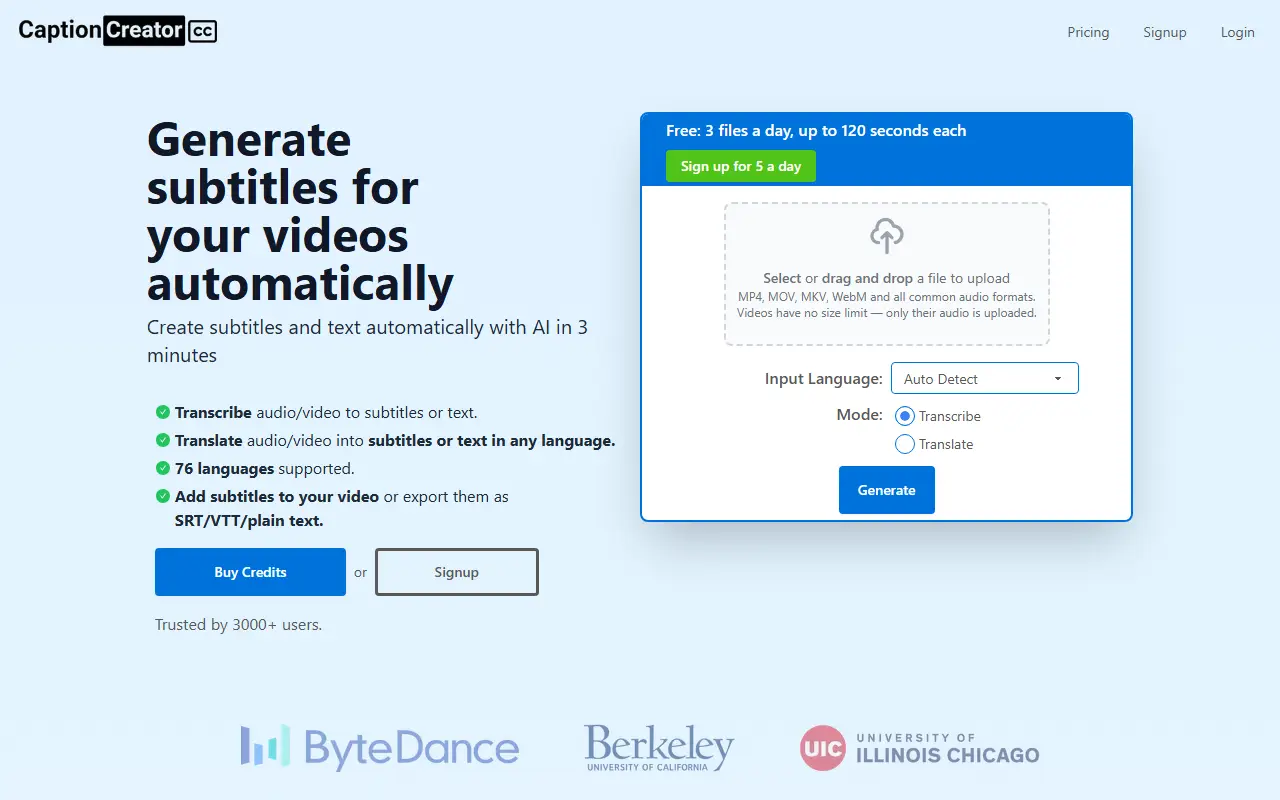
CaptionCreator is an online subtitle generator that uses AI to transcribe the speech in video or audio files. Users upload a file, choose the input language or let it be detected automatically, and receive subtitles that can be added to the video or downloaded in SRT, VTT or plain text formats.
Beyond transcription, the service can translate spoken content into subtitles in any of its supported languages, and it supports 76 in total. It is designed to cope with noisy recordings, recordings with several languages and varied accents. Only the audio track is uploaded, so videos have no size limit, and burned-in subtitles can be added to the resulting video.
CaptionCreator is a hosted commercial service without a self-hosted version. A free allowance lets visitors try it without paying, and credits can be purchased for heavier use. It suits creators, educators and small teams who need quick subtitle files without installing software.
Key features
- Transcription of video and audio to subtitles
- Translation into any of 76 languages
- Export as SRT, VTT or plain text
- Handles noisy audio and multiple accents
- Only audio is uploaded, so no video size limit
- Option to burn subtitles into the video
Good fit for
- →Adding subtitles to YouTube and social videos
- →Translating videos for other audiences
- →Turning recordings into text transcripts
- Tags
- subtitles
- transcription
- translation
- srt
- ai-captions
- video
- speech-to-text
- saas
CaptionCreator: questions and answers
- What is CaptionCreator used for?
- CaptionCreator is a web service that generates subtitles from video or audio in 76 languages, with optional translation and export as SRT, VTT or plain text. It is a good fit for adding subtitles to YouTube and social videos, translating videos for other audiences, and turning recordings into text transcripts.
- How much does CaptionCreator cost?
- CaptionCreator is a paid product with no free plan. Free tier allows 3 files a day of up to 120 seconds each (5 a day after signup); extra usage is covered by purchasable credits.
- Is CaptionCreator open source?
- No. CaptionCreator is proprietary (closed-source) software and can't be self-hosted. In the Video Editing category, open-source options include OBS Studio, HandBrake and Screenity.
- What are some alternatives to CaptionCreator?
- CaptionCreator competes with VEED, Kapwing and Happy Scribe.
Open-source alternatives to CaptionCreator
See all
OBS Studio
Video Editing
OBS Studio - Free and open source software for live streaming and screen recording
GPL-2.0vs vMix★ 77k
HandBrake
Video Editing
HandBrake's development repository
OSS★ 25k
Screenity
Video Editing
The free and privacy-friendly screen recorder with no limits 🎥
GPL-3.0vs Screencastify★ 19k
FFmpeg
Video Editing
Mirror of https://git.ffmpeg.org/ffmpeg.git
OSS★ 65k
Nexrender
Video Editing
📹 Data-driven render automation for After Effects
MIT★ 1.9k
OpenCut
Video Editing
The open-source CapCut alternative
MITvs CapCut★ 91k
SaaS alternatives to CaptionCreator
See all
VEED
AI Tools
Browser-based video editor with auto subtitles, AI avatars and screen recording
SaaS
Kapwing
Video Editing
Browser-based video editor with subtitles, templates and AI tools
SaaS
Happy Scribe
AI Tools
Transcription, subtitling and translation service
SaaS
Submagic
Video Editing
AI tool that adds captions and edits to short-form videos
SaaS
Captions
Video Editing
AI video editing app for captions, dubbing and talking-head content
SaaS
AutoSubtitles
Video Editing
AI transcription and subtitling for videos with SRT/VTT export and styled burned-in captions
SaaS