
About Toolbar
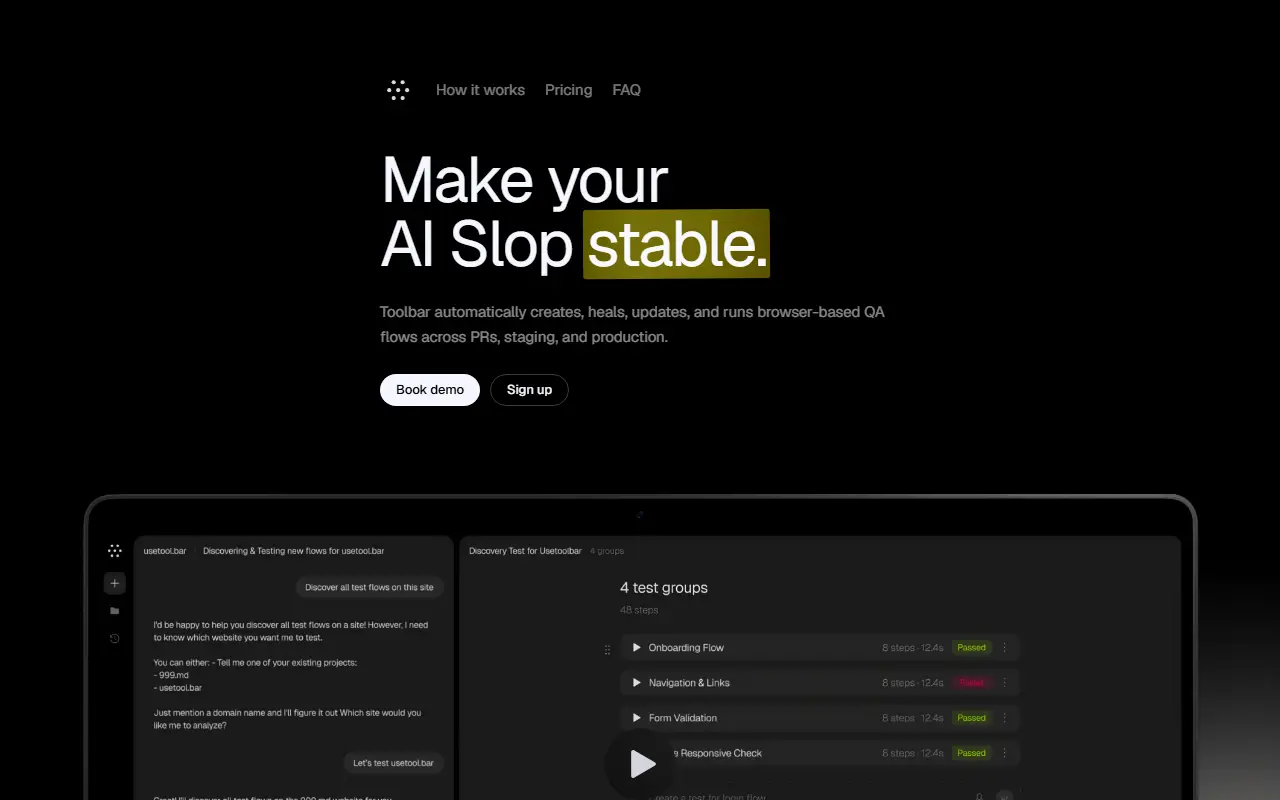
Toolbar is a QA service for teams shipping web apps quickly. You describe a journey in plain English, such as testing signup or checkout, and it generates browser-based test flows from your product, code and context without selectors or hand-written scripts. When the interface changes, flows are repaired and updated on their own, which keeps coverage from decaying the way a traditional regression suite does.
Flows run on every pull request, before deploys, on schedules or continuously in production. Each run produces screenshots, a replay, logs and an actionable failure report. You can guide the agent in chat to add assertions or change behavior. It supports authenticated flows including OAuth and one-time passwords, workspaces per project, GitHub integration, CI hooks and shared environments, plus Slack or Linear alerts. A browser extension is also offered for capturing bugs.
The site distinguishes it from using a coding assistant to write tests: it runs them in a real browser and keeps them working. Pricing is €299 per month and is based on QA agent runs, where one run is one product flow tested in a real browser.
Key features
- Plain-English test descriptions
- Self-healing browser test flows
- Runs on PRs, staging and production
- Screenshots, replays and failure reports
- Authenticated flows with OAuth and OTP
- GitHub, CI hooks and Slack or Linear alerts
- Production monitoring of key flows
Good fit for
- Catching regressions from AI-generated code
- Validating checkout and onboarding after each PR
- Monitoring critical flows in production
Toolbar: questions and answers
- What is Toolbar used for?
- Toolbar is AI test automation for web apps that generates, heals and runs browser-based QA flows from plain-English descriptions on pull requests, staging and production. It is a good fit for catching regressions from AI-generated code, validating checkout and onboarding after each PR, and monitoring critical flows in production.
- How much does Toolbar cost?
- Paid plans for Toolbar start at €299 per month, and there is no free plan.
- Is Toolbar open source?
- No. Toolbar is proprietary (closed-source) software and can't be self-hosted. In the Testing & QA category, open-source options include WebdriverIO, Shortest and Appium.
- What are some alternatives to Toolbar?
- Toolbar competes with Marker.io, Userback and BugHerd.
Open-source alternatives to Toolbar
See all
WebdriverIO
Testing & QA
Next-gen browser and mobile automation test framework for Node.js
MITvs BrowserStack★ 9.8k
Shortest
Testing & QA
QA via natural language AI tests
MITvs mabl★ 5.7k
Appium
Testing & QA
Cross-platform automation framework for all kinds of apps, built on top of the W3C WebDriv
Apache-2.0vs BrowserStack★ 22k
Detox
Testing & QA
Gray box end-to-end testing and automation framework for mobile apps
MITvs Kobiton★ 12k
Robot Framework
Testing & QA
Generic automation framework for acceptance testing and RPA
Apache-2.0vs Katalon★ 12k
QA Wolf CLI
Testing & QA
QA Wolf from anywhere — your terminal, your CI, your AI agent.
Apache-2.0★ 3.5k
SaaS alternatives to Toolbar
See all
Marker.io
Testing & QA
Website feedback tool capturing screenshots, console logs and session replay
SaaS
Userback
Testing & QA
Visual feedback widget with session replay and screenshot bug reports
SaaS
BugHerd
Testing & QA
Visual website feedback and bug tracking tool for web teams
SaaS
Jam
Testing & QA
Browser extension that captures bug reports with console logs and replays
SaaS
Usersnap
Testing & QA
Visual bug reporting and customer feedback tool for websites
SaaS
Gleap
Testing & QA
Bug reporting, in-app feedback and support widget for software teams
SaaS