 TrackMedia
 TrackRev

About DodoDeck
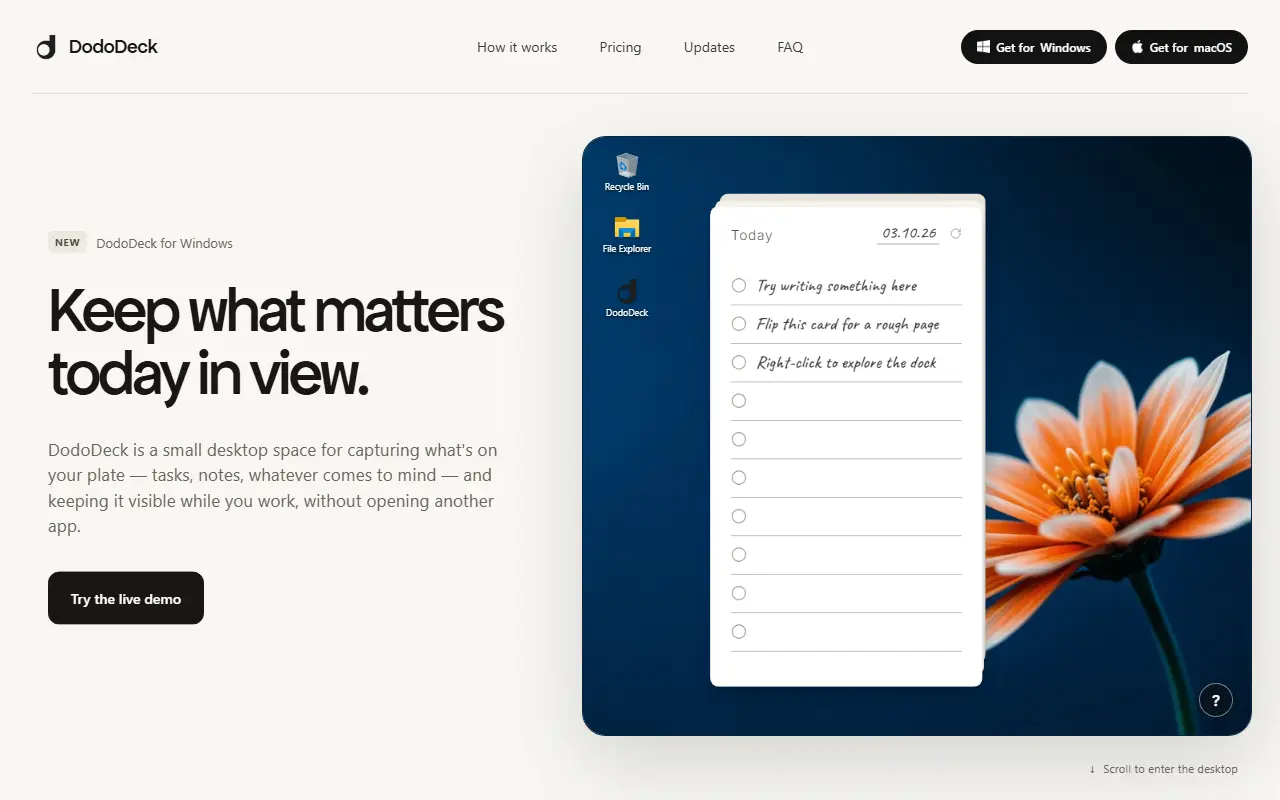
DodoDeck is a lightweight desktop space for jotting down tasks and notes without opening another full application. You click a line on a card and start typing, and it saves as you go with no setup, so ideas can be captured the moment they appear.
Cards can be flipped over to a blank page, called Rough Pages, for notes, screenshots, links or video that do not belong on a task list. The deck can be docked above the taskbar and brought back with a click, and the app includes card, focus and media docks. Cards can be shared as images, and exported or imported as .dododeck files.
DodoDeck runs on 64-bit Windows 10 and 11, with a macOS version submitted for App Store review. It is a commercial product with a 14-day full-featured trial and a one-time license, with no subscription or account.
Key features
- Task cards you type into directly
- Flip-side Rough Pages for notes and media
- Dock that stays above the taskbar
- Focus timer and media docks
- Share cards as images or export files
Good fit for
- Keeping today's tasks visible while working
- Jotting quick notes and links without switching apps
DodoDeck: questions and answers
- What is DodoDeck used for?
- DodoDeck is a small Windows desktop app that keeps daily task cards and free-form notes visible while you work, with a focus timer and a macOS version pending. It is a good fit for keeping today's tasks visible while working, and jotting quick notes and links without switching apps.
- How much does DodoDeck cost?
- DodoDeck is a paid product with no free plan. 14-day free trial with all features, then a one-time $5 purchase for up to two devices, with no subscription.
- Is DodoDeck open source?
- No. DodoDeck is proprietary (closed-source) software. In the Productivity category, open-source options include MarkerOn, PowerToys and ShareX.
- What are some alternatives to DodoDeck?
- DodoDeck competes with Todoist, TickTick and Things.
Open-source alternatives to DodoDeck
See all
MarkerOn
Productivity
Lightweight (~1.5 MB) open-source screen annotation with click-through mode and keyboard-f
MIT★ 1.2k
PowerToys
Productivity
Microsoft PowerToys is a collection of utilities that supercharge productivity and customi
MITvs Alfred★ 141k
ShareX
Productivity
ShareX is a free and open-source application that enables users to capture or record any a
GPL-3.0vs Snagit★ 41k
Files
Productivity
A modern file manager that helps users organize their files and folders.
MIT★ 47k
Rectangle
Productivity
Move and resize windows on macOS with keyboard shortcuts and snap areas
OSSvs BetterTouchTool★ 30k
Flow Launcher
Productivity
:mag: Quick file search & app launcher for Windows with community-made plugins
MITvs Raycast★ 16k
SaaS alternatives to DodoDeck
See all
Todoist
Productivity
Task manager with projects, natural-language due dates and shared lists
SaaS
TickTick
Productivity
To-do list with calendar views, habit tracker and Pomodoro timer
SaaS
Things
Productivity
Task manager for Apple devices with areas, projects and a clean Today view
SaaS
Any.do
Productivity
Task manager and daily planner with reminders and calendar sync
SaaS
Motion
Productivity
AI planner that auto-schedules tasks and meetings on the calendar
SaaS
Sunsama
Productivity
Daily planner that pulls tasks from other tools into a time-blocked schedule
SaaS