
About Files
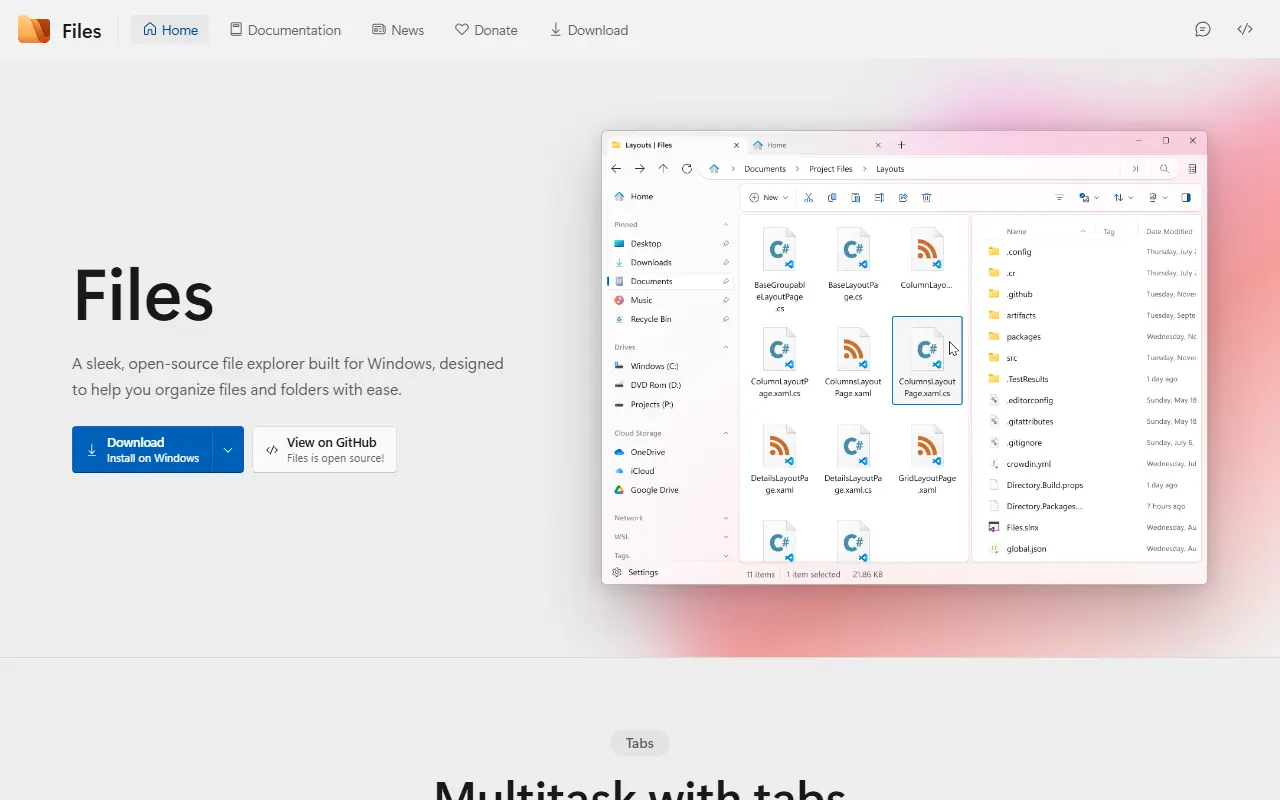
Files is an open-source file manager for Windows that helps you organize files and folders. It is built with C# on .NET and WinUI, follows the Fluent design language, and is released under the MIT license. It targets Windows 10 and Windows 11 and is developed by the Files community.
The documentation lists features including tabs for working with several folders in one window, a dual pane for managing two folders side by side, tagging of files and folders, and cloud drive integration. Other options cover a command palette, connecting to FTP servers, Git integration, a layout picker, folder backgrounds, an omnibar and third-party integrations.
Settings can be customized across appearance, layouts, tags and folder behavior. The project accepts contributions, with guides to coding conventions, compiling the source and translating the app. Files suits power users and developers who want something more flexible than the default Windows file explorer, with tabs and Git awareness built in.
Key features
- Tabs for multiple folders in one window
- Dual pane for side-by-side folders
- Tags for files and folders
- Git integration and a command palette
- Cloud drive and FTP server support
- Layout picker and folder backgrounds
Good fit for
- →Replacing the default Windows file explorer
- →Developers browsing Git repositories
- →Managing files across cloud drives
- Tags
- file-manager
- windows
- winui
- dotnet
- csharp
- productivity
- dual-pane
- git
Files: questions and answers
- What is Files used for?
- Files is an open-source file manager for Windows with tabs, dual pane, tags, Git integration, cloud drive support and a command palette. It is a good fit for replacing the default Windows file explorer, developers browsing Git repositories and managing files across cloud drives.
- Is Files open source?
- Yes. Files is open source under the MIT licence. Its source code is on GitHub at files-community/Files and is written mainly in C#.
- Is Files free?
- Yes. Files is open source, so the software itself is free to use.
- Can I self-host Files?
- Yes. Files can be self-hosted on your own server or infrastructure; there is no official hosted version.
- What are some alternatives to Files?
- Similar open-source tools in the Productivity category include ShareX, Flow Launcher and PowerToys. SaaS products in the same category include AWNA, BuildNotch and DodoDeck.
- Is Files actively maintained?
- Yes. The most recent commit to Files was on 24 September 2026, and the latest release is v4.2.9, published on 19 August 2026. The project has 46k stars on GitHub.
Open-source alternatives to Files
See all
ShareX
Productivity
ShareX is a free and open-source application that enables users to capture or record any a
GPL-3.0vs Snagit★ 40k
Flow Launcher
Productivity
:mag: Quick file search & app launcher for Windows with community-made plugins
MITvs Raycast★ 16k
PowerToys
Productivity
Microsoft PowerToys is a collection of utilities that supercharge productivity and customi
MITvs Alfred★ 139k
MarkerOn
Productivity
Lightweight (~1.5 MB) open-source screen annotation with click-through mode and keyboard-f
MIT★ 1.1k
LetoReader
Productivity
A free self-hostable speed reader. Highly customizable. Implements chunking (RSVP), pacing
GPL-3.0★ 314
Zen Browser
Productivity
Welcome to a calmer internet
MPL-2.0vs Google Chrome★ 45k
SaaS alternatives to Files
See all
AWNA
Productivity
Windows notch at the top of the screen with tabs for meetings, tasks, notes, timers and clipboard history
SaaS
BuildNotch
Productivity
Windows notch bar showing music, tasks, a focus timer, AI tools and project stats at the top of the screen
SaaS
DodoDeck
Productivity
Lightweight desktop app that keeps daily tasks on one side and rough notes on the other
SaaS
Listary
Productivity
Windows file search and launcher utility
SaaS
Raycast
Productivity
Launcher for macOS and Windows with extensions, snippets and an AI assistant
SaaS
1% Better
Productivity
Habit tracker mobile app that visualises how small daily progress compounds over time
SaaS