About Annotator
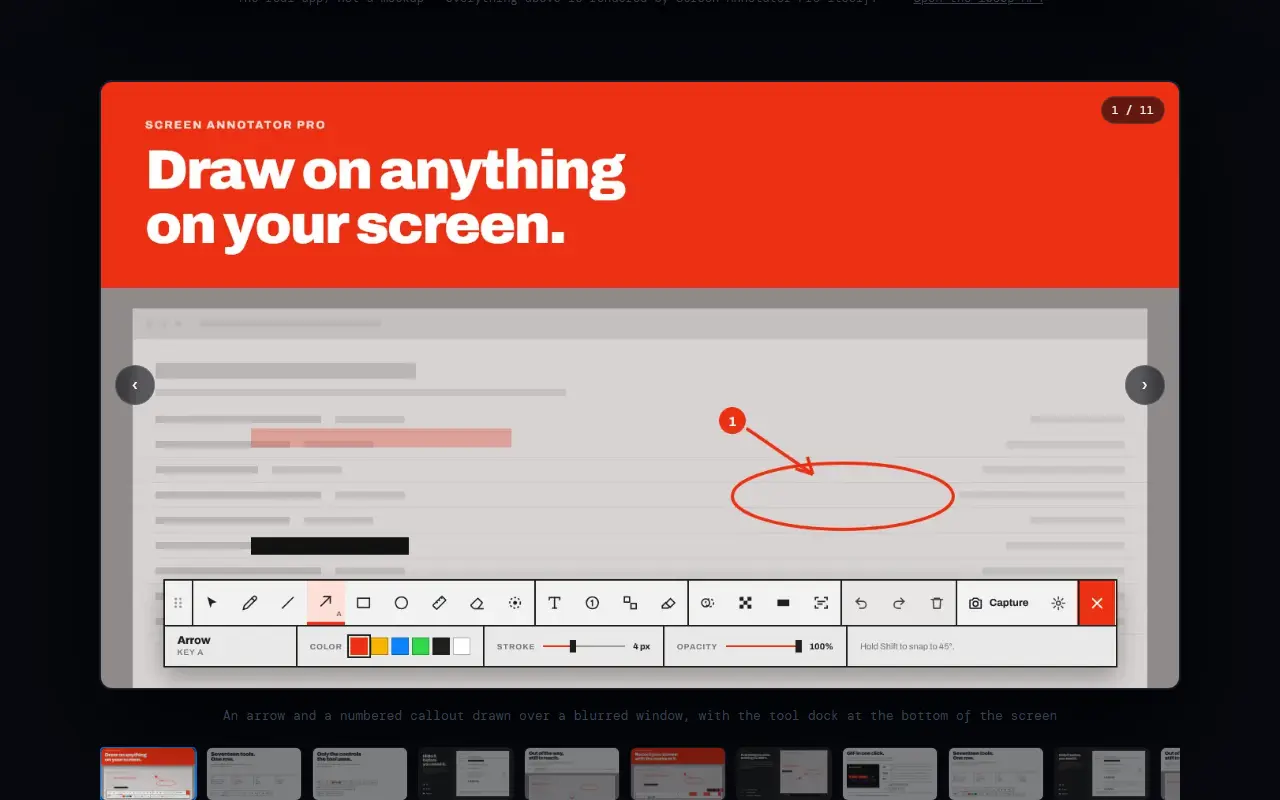
Annotator, sold as Screen Annotator Pro, is a desktop tool for Windows 10 and 11 that places a transparent overlay across the whole screen. With a hotkey you can draw on top of any running application without touching what is underneath, which makes it useful for presentations, tutorials and video calls in tools such as Zoom and Teams.
Drawing tools include straight, double and curved arrows, lines, outlined and filled shapes, a pressure-sensitive pen, rulers, text, speech bubbles, stamps, numbered callouts and highlights. Marks can be moved, resized or recolored after drawing. Redaction tools offer Gaussian blur, pixelation and solid black boxes, and the vendor notes that only a solid fill is truly safe for passwords. The app also takes annotated screenshots, measures pixels, performs OCR and records the screen with annotations included. It runs fully offline on 64-bit Windows with no subscription, and is sold through the Microsoft Store as a one-time purchase.
Key features
- Transparent live drawing overlay on any screen
- Arrows, callouts, shapes and highlights
- Blur, pixelate and black-box redaction
- Annotated screenshots to clipboard or PNG
- Screen recording with annotations baked in
- OCR and pixel measuring tools
Good fit for
- →Annotating the screen during video meetings
- →Redacting sensitive data before sharing screenshots
- →Recording tutorials with arrows and callouts
- Tags
- screen-annotation
- windows
- screenshot
- screen-recording
- redaction
- ocr
- desktop-app
Annotator: questions and answers
- What is Annotator used for?
- Annotator is a Windows screen markup app that overlays your display so you can draw, blur, measure, screenshot and record with annotations baked in. It is a good fit for annotating the screen during video meetings, redacting sensitive data before sharing screenshots, and recording tutorials with arrows and callouts.
- Is Annotator open source?
- No. Annotator is proprietary (closed-source) software. In the Productivity category, open-source options include ShareX, BetterShot and MarkerOn.
- What are some alternatives to Annotator?
- Other SaaS products in the Productivity category include BlurScreen, AI Renamer and AWNA.
Open-source alternatives to Annotator
See all
ShareX
Productivity
ShareX is a free and open-source application that enables users to capture or record any a
GPL-3.0vs Snagit★ 40k
BetterShot
Productivity
Screenshot, screen recording, and video editor for macOS. Native SwiftUI app with capture
OSSvs CleanShot X★ 2.4k
MarkerOn
Productivity
Lightweight (~1.5 MB) open-source screen annotation with click-through mode and keyboard-f
MIT★ 1.1k
Flameshot
Productivity
Powerful yet simple to use screenshot software :desktop_computer: :camera_flash:
GPL-3.0vs Snagit★ 31k
PowerToys
Productivity
Microsoft PowerToys is a collection of utilities that supercharge productivity and customi
MITvs Alfred★ 139k
Stirling PDF
Productivity
A free, private PDF editor you can run on any infrastructure.
OSSvs Adobe Acrobat★ 93k
SaaS alternatives to Annotator
See all
BlurScreen
Productivity
Blurs sensitive data on your screen while recording or screen sharing, with no post-editing
SaaS
AI Renamer
Productivity
Renames files automatically based on their content using AI, with a local or cloud mode
SaaS
AWNA
Productivity
Windows notch at the top of the screen with tabs for meetings, tasks, notes, timers and clipboard history
SaaS
Blur It
Productivity
Censors passwords, emails and sensitive data on your screen before you share it on Zoom, Meet or Loom
SaaS
Book My Luck
Productivity
Desktop app that hangs a swinging lucky charm from the top of your Mac or Windows screen
SaaS
BuildNotch
Productivity
Windows notch bar showing music, tasks, a focus timer, AI tools and project stats at the top of the screen
SaaS