
About TurtleBar
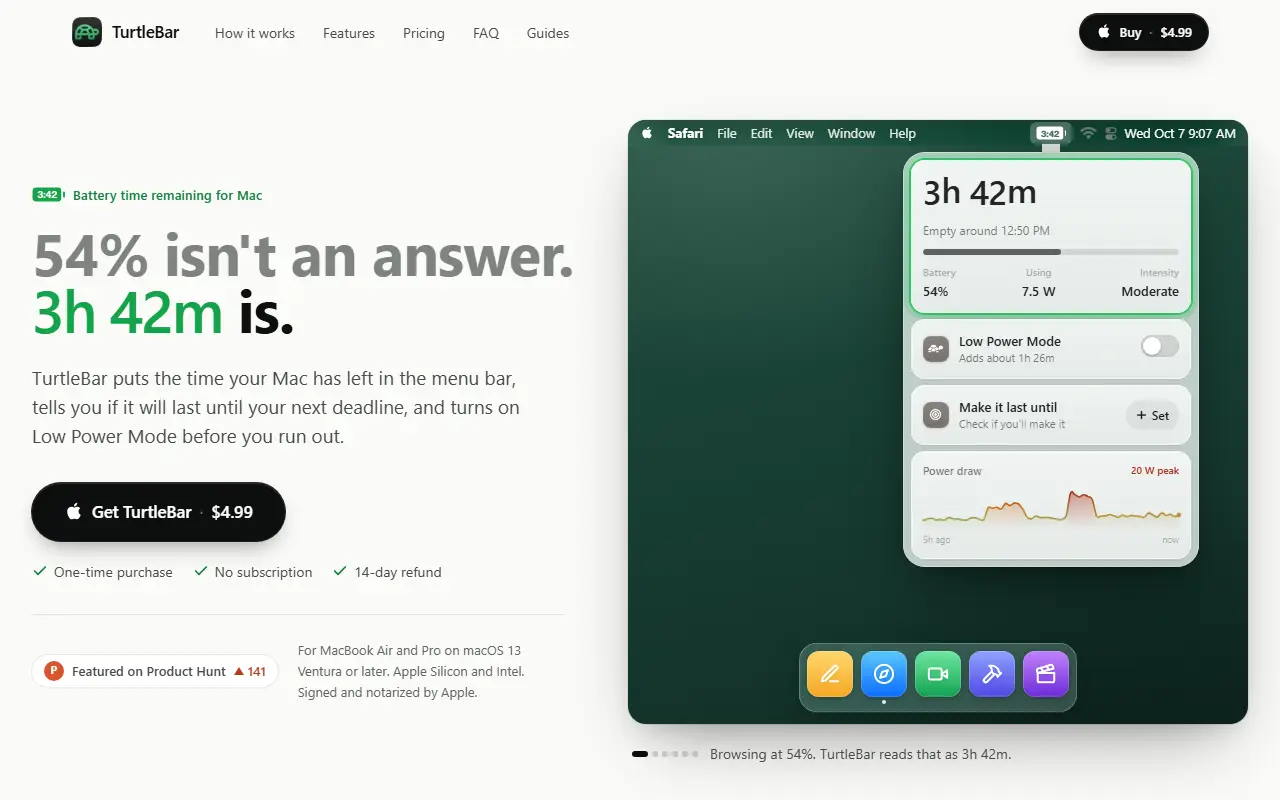
TurtleBar replaces a battery percentage with time left. It reads the watts your Mac is drawing right now and divides the remaining charge by that, like a trip computer, then shows a countdown in the menu bar. The estimate catches up within about a minute when your workload changes, shows an adjusting state while it does, and learns what your Mac draws at each hour so projections such as the time it will empty reflect your day.
A Make it last until feature lets you set a time, such as the end of a flight or a meeting, and tells you whether you will make it and by how much. If you will fall short, you get one notification and the app can switch on Low Power Mode, including automatically before you run out, and shows how much time it would add. The site also describes power rules per app.
It supports MacBook Air and Pro on macOS 13 or later, on Apple Silicon and Intel, and is signed and notarized by Apple. It costs $4.99 once with no subscription and a 14-day refund. Its FAQ and guides explain how the estimate works and why Apple removed time remaining from the menu bar in 2016.
Key features
- Battery time remaining in the menu bar
- Estimate based on live power draw
- Make it last until a chosen time
- Automatic Low Power Mode
- Learns your usage pattern by hour
- Notification when the battery will fall short
Good fit for
- Checking if the battery lasts through a flight
- Avoiding surprise shutdowns before a meeting
TurtleBar: questions and answers
- What is TurtleBar used for?
- TurtleBar is a Mac menu bar app that shows real battery time remaining, tells you if the battery will last until a deadline and switches on Low Power Mode by itself. It is a good fit for checking if the battery lasts through a flight and avoiding surprise shutdowns before a meeting.
- How much does TurtleBar cost?
- TurtleBar is a paid product with no free plan. One-time purchase of $4.99 with no subscription and a 14-day refund.
- Is TurtleBar open source?
- No. TurtleBar is proprietary (closed-source) software. In the Productivity category, open-source options include Maccy, Ice and Stats.
- What are some alternatives to TurtleBar?
- Other SaaS products in the Productivity category include Bartender, DockLockr and MacGlow.
Open-source alternatives to TurtleBar
See all
Maccy
Productivity
Lightweight clipboard manager for macOS
MITvs Paste★ 22k
Ice
Productivity
Powerful menu bar manager for macOS
GPL-3.0vs Bartender★ 30k
Stats
Productivity
macOS system monitor in your menu bar
MIT★ 42k
Rectangle
Productivity
Move and resize windows on macOS with keyboard shortcuts and snap areas
OSSvs BetterTouchTool★ 30k
MarkerOn
Productivity
Lightweight (~1.5 MB) open-source screen annotation with click-through mode and keyboard-f
MIT★ 1.1k
RustCast
Productivity
An open source alternative to raycast, in rust!! (retired)
MITvs Raycast★ 1.1k
SaaS alternatives to TurtleBar
See all
Bartender
Productivity
Menu bar organizer for macOS that hides and rearranges menu bar icons
SaaS
DockLockr
Productivity
Menu bar app that locks your macOS Dock in place against accidental drags and resizes
SaaS
MacGlow
Productivity
Mac utility that syncs brightness across your Mac and all connected monitors
SaaS
Tucket
Productivity
Mac clipboard manager that saves copied text, links, images and files and makes text in screenshots searchable
SaaS
DashPane
Productivity
Fast macOS app switcher with fuzzy search, single-key shortcuts and a hover sidebar
SaaS
DisplaySpan
Productivity
Mac menu bar app that lets the cursor cross blocked screen edges and restores saved display layouts
SaaS