
About OpenShorts
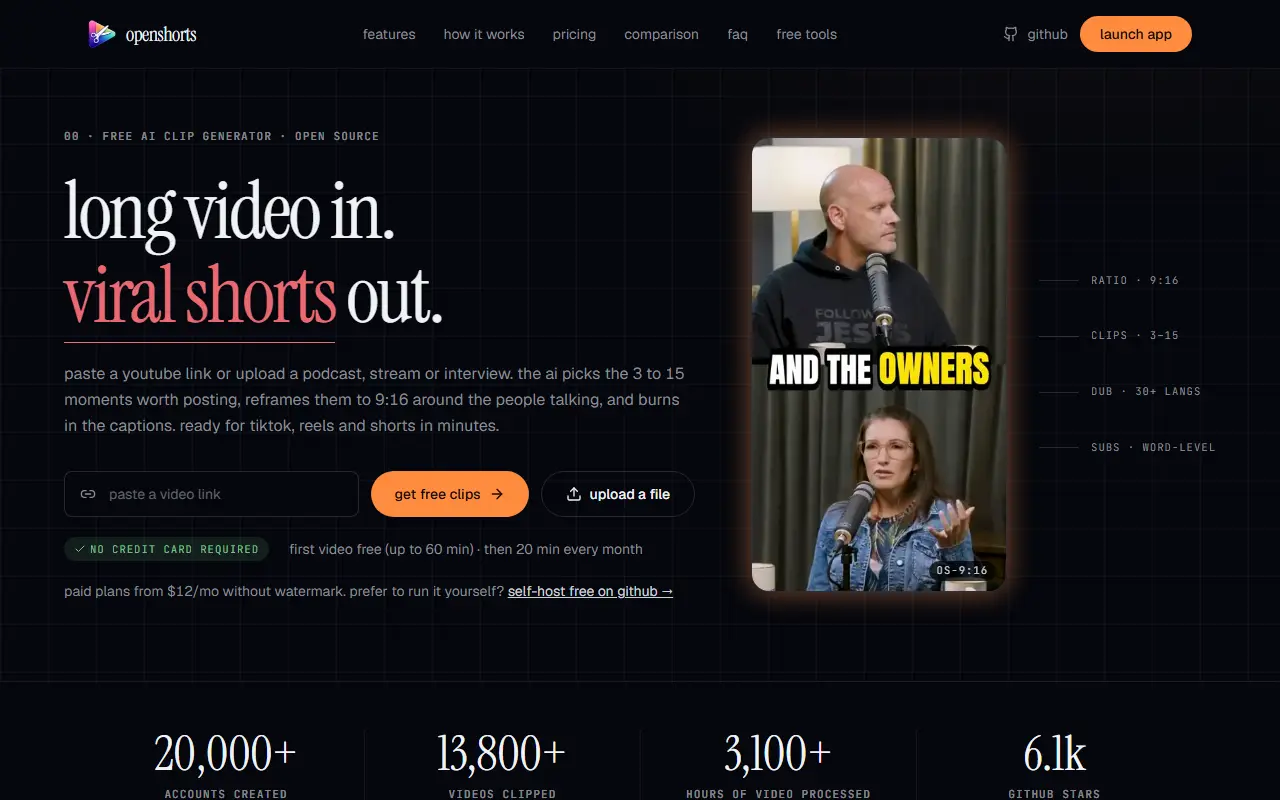
OpenShorts turns long videos such as podcasts, webinars, livestreams and interviews into short vertical clips. You paste a YouTube link or upload a file, and the AI picks 3 to 15 moments of 15 to 60 seconds, reframes them to 9:16 around the speakers, and burns in subtitles so the clips are ready for TikTok, Instagram Reels and YouTube Shorts.
Under the hood it uses faster-whisper for word-level transcription, PySceneDetect for scene boundaries, Google Gemini to score the transcript, FFmpeg for cutting, and MediaPipe face tracking with a YOLOv8 fallback for stable reframing. Extra options include AI hook text overlays, Gemini-generated FFmpeg effects, and voice dubbing in more than 30 languages through ElevenLabs. Claude, ChatGPT and n8n can drive it over MCP.
The project is MIT licensed and can be self-hosted with Docker using your own API keys, with no watermark or usage cap. A cloud version runs the same software: your first video of up to 60 minutes is free, then 20 free minutes per month with a watermark, and paid plans run from $12 to $59 per month without one.
Key features
- AI detection of the strongest video moments
- Face-tracking 9:16 vertical reframing
- Word-level automatic burned-in subtitles
- Voice dubbing in 30+ languages
- AI-written hook text overlays
- MCP access for Claude, ChatGPT and n8n
- Docker self-hosting under MIT
Good fit for
- Repurposing podcasts into short clips
- Cutting webinars and livestreams for social
- Self-hosting a clipping pipeline for private footage
OpenShorts: questions and answers
- What is OpenShorts used for?
- OpenShorts is an open-source AI tool that cuts long videos into vertical 9:16 clips with captions and hooks for TikTok, Reels and Shorts. It is a good fit for repurposing podcasts into short clips, cutting webinars and livestreams for social, and self-hosting a clipping pipeline for private footage.
- Is OpenShorts free?
- Yes. OpenShorts has a free plan. Free and open source (MIT) to self-host. Cloud: free tier with a watermark, paid plans from $12 to $59 per month.
- Is OpenShorts open source?
- No. OpenShorts is proprietary (closed-source) software. In the Video Editing category, open-source options include OpenCut, Cap and Kdenlive.
- Can I self-host OpenShorts?
- Yes. Although OpenShorts is closed source, it can be self-hosted on your own servers, and the vendor also offers a hosted version.
- What are some alternatives to OpenShorts?
- OpenShorts competes with Opus Clip, Vizard and Klap.
Open-source alternatives to OpenShorts
See all
OpenCut
Video Editing
The open-source CapCut alternative
MITvs CapCut★ 93k
Cap
Video Editing
Open source Loom alternative. Beautiful, shareable screen recordings.
OSSvs Loom★ 23k
Kdenlive
Video Editing
Free and open source video editor, based on MLT Framework and KDE Frameworks
GPL-3.0vs Adobe Premiere Pro★ 5.8k
OBS Studio
Video Editing
OBS Studio - Free and open source software for live streaming and screen recording
GPL-2.0vs vMix★ 77k
HandBrake
Video Editing
HandBrake's development repository
OSS★ 25k
Screenity
Video Editing
The free and privacy-friendly screen recorder with no limits 🎥
GPL-3.0vs Screencastify★ 19k
SaaS alternatives to OpenShorts
See all
Opus Clip
AI Tools
Cuts long videos into short vertical clips with captions for social platforms
SaaS
Vizard
Video Editing
AI tool that turns long videos into short clips with captions
SaaS
Klap
Video Editing
AI tool that converts long videos into short clips for social media
SaaS
Submagic
Video Editing
AI tool that adds captions and edits to short-form videos
SaaS
VEED
AI Tools
Browser-based video editor with auto subtitles, AI avatars and screen recording
SaaS
StoryHero
Video Editing
AI tool that turns long videos into short captioned clips for TikTok, Reels and YouTube Shorts
SaaS