
About ScanlyGo
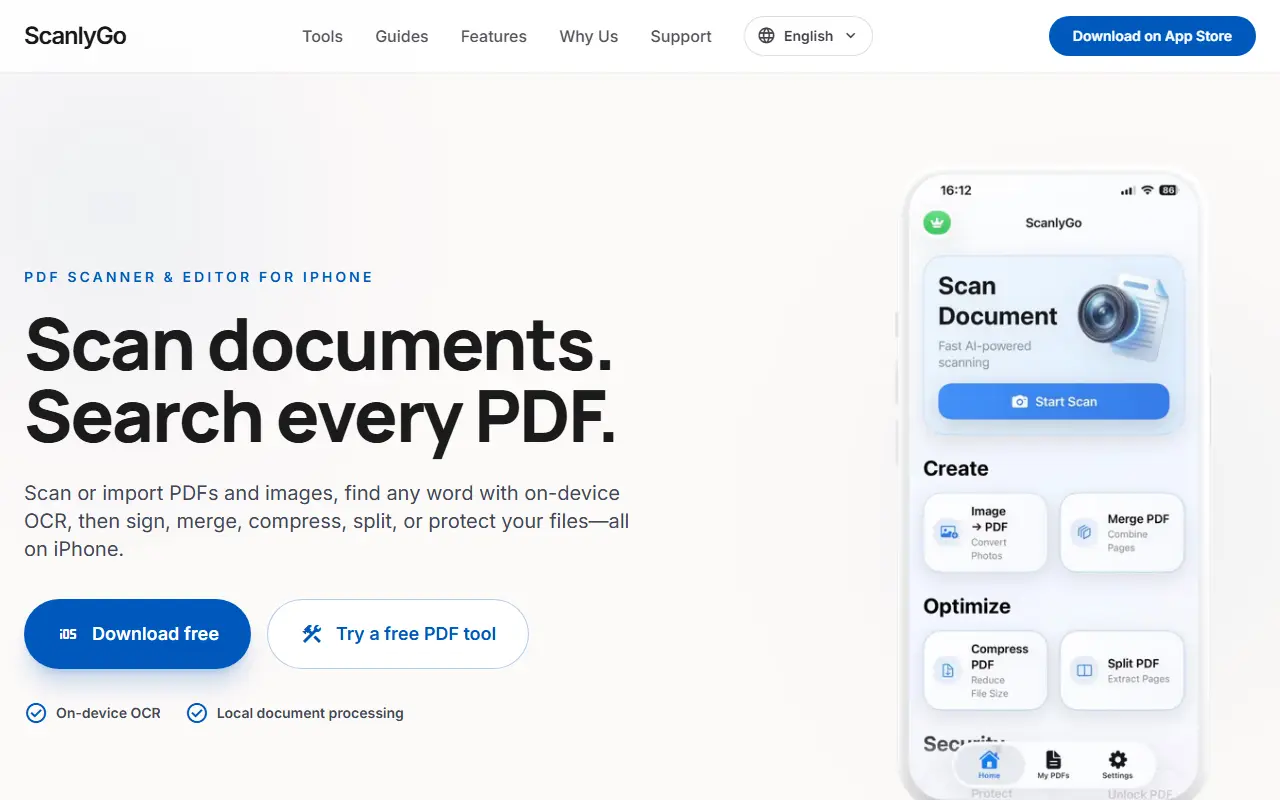
ScanlyGo is an iPhone app for scanning and managing documents. You scan with the camera or import PDFs and images, and on-device OCR lets you find any word across your PDFs. Tools include signing documents with precisely placed signatures, merging and splitting, compressing files for email or messaging, converting images, documents and spreadsheets to PDF, and protecting or unlocking PDFs.
Processing happens on the device, and documents are sent to ScanlyGo servers only if you decide to share or export them. Sharing can happen through Slack, email or WhatsApp. The same developer also offers an image converter that converts photos between JPEG, HEIC, PNG and TIFF and can crop, resize, adjust, compress and remove backgrounds.
The site also offers private browser tools and guides for converting images to PDF, merging PDFs and splitting PDFs without uploading, and it is available in English, Spanish and Arabic. The app is free to download.
Key features
- Document scanning with the camera
- On-device OCR search across PDFs
- Sign, merge, split and compress PDFs
- Protect and unlock PDF files
- Conversion of images and documents to PDF
- Local processing without server uploads
Good fit for
- Scanning paperwork with an iPhone
- Signing a contract from your phone
- Searching old PDFs for a specific word
ScanlyGo: questions and answers
- What is ScanlyGo used for?
- ScanlyGo is an iPhone PDF toolkit for scanning documents, searching them with on-device OCR, and signing, merging, compressing, splitting and locking files. It is a good fit for scanning paperwork with an iPhone, signing a contract from your phone and searching old PDFs for a specific word.
- Is ScanlyGo free?
- Yes. ScanlyGo has a free plan.
- Is ScanlyGo open source?
- No. ScanlyGo is proprietary (closed-source) software. In the Productivity category, open-source options include Stirling PDF, BentoPDF and Foqos.
- What are some alternatives to ScanlyGo?
- ScanlyGo competes with Adobe Acrobat, Smallpdf and iLovePDF.
Open-source alternatives to ScanlyGo
See all
Stirling PDF
Productivity
A free, private PDF editor you can run on any infrastructure.
OSSvs Adobe Acrobat★ 94k
BentoPDF
Productivity
The Privacy First PDF Toolkit
AGPL-3.0vs iLovePDF★ 16k
Foqos
Productivity
Foqos allows you to lock apps behind the tap of a NFC tag or scan of a QR code. Free and o
MITvs Freedom★ 860
OCRmyPDF
Productivity
OCRmyPDF adds an OCR text layer to scanned PDF files, allowing them to be searched
MPL-2.0vs Adobe Acrobat★ 35k
Zen Browser
Productivity
Welcome to a calmer internet
MPL-2.0vs Google Chrome★ 45k
ShareX
Productivity
ShareX is a free and open-source application that enables users to capture or record any a
GPL-3.0vs Snagit★ 40k
SaaS alternatives to ScanlyGo
See all
Adobe Acrobat
Productivity
PDF reader and editor with e-signature and document conversion
SaaS
Smallpdf
Productivity
Browser-based PDF tools for merging, compressing, editing and signing
SaaS
iLovePDF
Productivity
Online PDF tools for splitting, merging, compressing and converting
SaaS
PDF Expert
Productivity
PDF reader, annotator and editor for Mac, iPhone and iPad
SaaS
ProperPDF
Productivity
Mobile app to edit, compress and chat with PDFs offline without uploads
SaaS
OxygenPDF
Productivity
Private PDF toolkit that runs without uploading your files
SaaS