
About Heynote
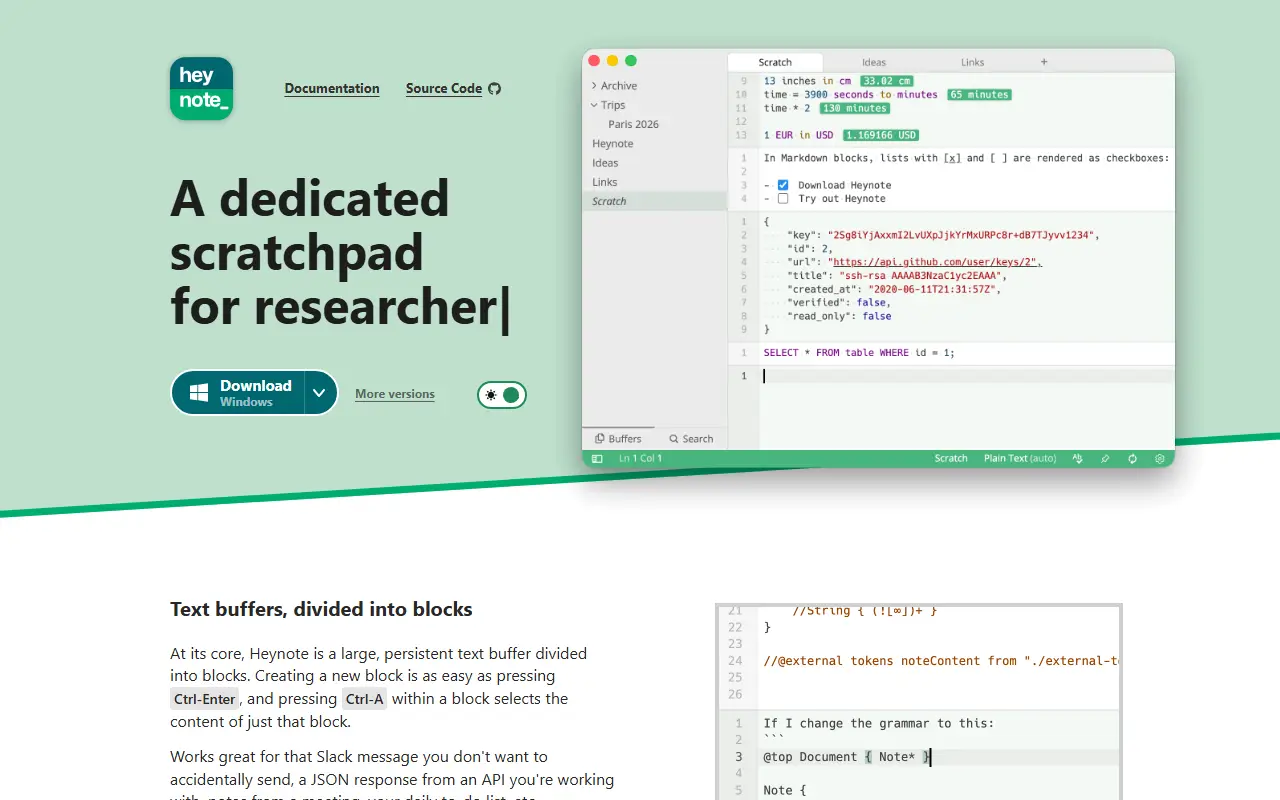
Heynote is a scratchpad and note-taking app for developers and power users. It works like one large persistent text buffer where you can drop anything: a Slack message you are not ready to send, an API's JSON response, meeting notes or a daily to-do list.
Buffers are divided into blocks, and each block can be assigned a language such as JavaScript, JSON or Markdown, giving syntax highlighting and auto-formatting for JSON. Language auto-detection, multiple buffers in tabs, single and multi-buffer search, inline images, a math and calculator mode with currency conversion, multi-cursor editing, spell checking and dark and light themes are included. A global hotkey can show or hide the app, and key bindings can be default, Emacs-like or custom.
Heynote runs on macOS, Windows and Linux; there is no mobile app. It is built with JavaScript and its license is listed as Other, so check the repository terms before reuse. The author accepts contributions that fit the project's vision, especially bug fixes.
Key features
- Block-based persistent text buffers
- Per-block syntax highlighting for many languages
- Math mode with currency conversion
- Multiple buffers in tabs
- Auto-formatting and language detection
- Global hotkey and custom key bindings
Good fit for
- →Quick scratch notes for developers
- →Holding API responses and snippets while debugging
- Built with
- JavaScript
- Tags
- scratchpad
- note-taking
- developer-tools
- desktop-app
- editor
- productivity
- syntax-highlighting
Heynote: questions and answers
- What is Heynote used for?
- Heynote is a desktop scratchpad for developers and power users, built around a persistent, block-based text buffer with per-block syntax highlighting. It is a good fit for quick scratch notes for developers, and holding API responses and snippets while debugging.
- Is Heynote open source?
- Yes. Heynote is open source under a custom licence. Its source code is on GitHub at heyman/heynote and is written mainly in JavaScript.
- Is Heynote free?
- Yes. Heynote is open source, so the software itself is free to use under the terms of its own licence.
- Can I self-host Heynote?
- Yes. Heynote can be self-hosted on your own server or infrastructure.
- What is Heynote an alternative to?
- Heynote is an open-source alternative to Drafts and Tot. Other open-source alternatives to Drafts include Simplenote, Memos and FSNotes.
- Is Heynote actively maintained?
- The most recent commit to Heynote was on 24 June 2026, and the latest release is v2.9.1, published on 15 July 2026. The project has 5.4k stars on GitHub.
Open-source alternatives to Heynote
See all
Simplenote
Note Taking
Simplenote for Web, Windows, and Linux
GPL-2.0vs Evernote★ 5.3k
Memos
Note Taking
Your own timeline for quick notes, private by default.
MITvs Google Keep★ 63k
FSNotes
Note Taking
Fast Markdown note-taking app for Mac and iPhone
MITvs Bear★ 7.5k
Blinko
Note Taking
An open-source, self-hosted personal AI note tool prioritizing privacy, built using TypeSc
GPL-3.0vs Google Keep★ 11kFlatnotes
Note Taking
A self-hosted, database-less note taking web app that utilises a flat folder of markdown f
MITvs Evernote★ 3.2k
Cowyo
Note Taking
A feature-rich wiki webserver for minimalists :cow: :speech_balloon:
OSSvs Tot★ 979
SaaS alternatives to Heynote
See all
Drafts
Note Taking
Quick-capture text app for Apple devices with actions to send notes elsewhere
SaaS
Tot
Note Taking
Tiny Mac and iOS scratchpad with seven color-coded dots for text
SaaS
Brain Dump
Note Taking
Minimalist note-taking app for capturing and transforming ideas quickly
SaaS
Braindump
Note Taking
Minimal private space to capture thoughts, ideas, notes and tasks
SaaS
iA Writer
Note Taking
Minimal markdown writing app with focus mode and cross-device sync
SaaS
Ulysses
Note Taking
Markdown writing app for Apple devices with libraries and export options
SaaS