
About Dictato
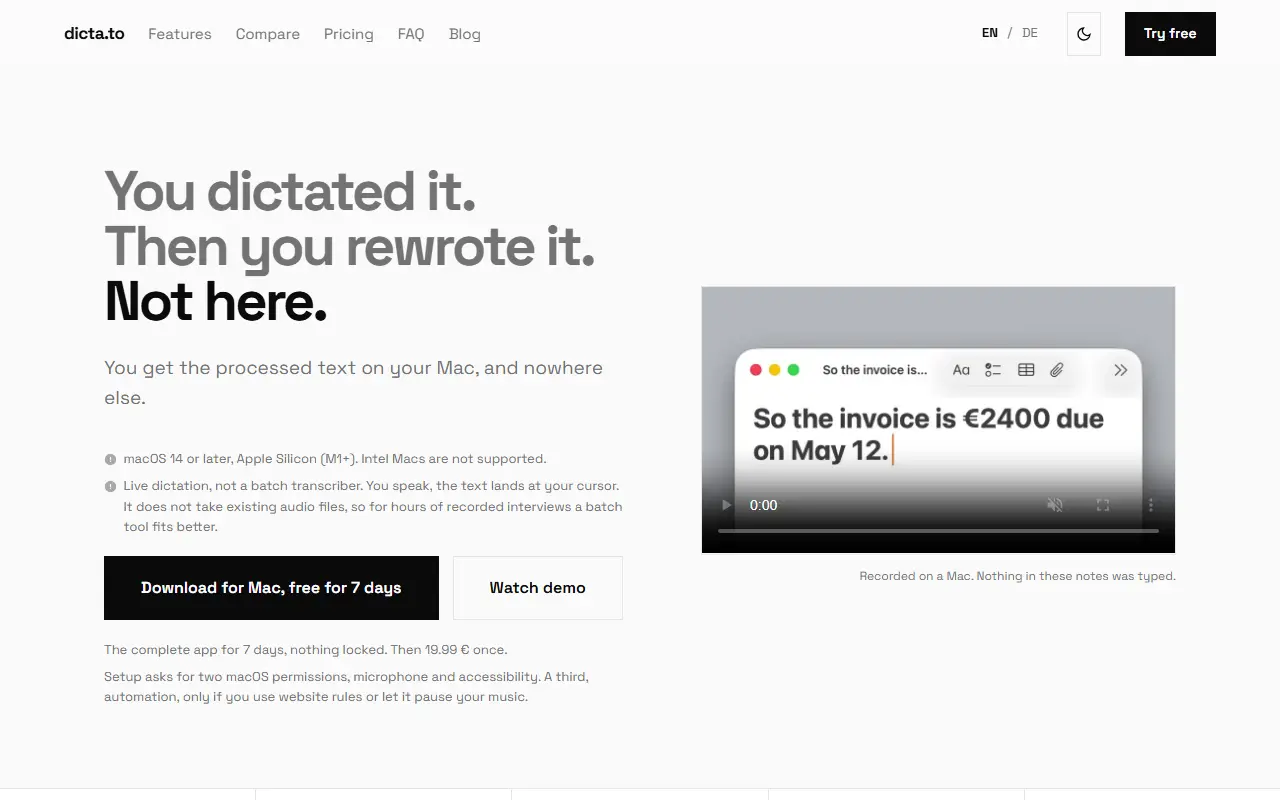
Dictato is a live dictation app for Mac. You speak, and finished text appears at your cursor in any app, with punctuation and structure added automatically. Everything runs on the device, with no cloud and no account, and it works offline. The site compares it with the built-in Mac dictation, which stops after a period of silence and adds punctuation without structuring paragraphs.
It listens until you release the key, offers four speech engines including Apple's own and one covering 99 languages, and auto-detects more than 25 languages. It requires macOS 14 or later on Apple Silicon, and setup asks for microphone and accessibility permissions, plus automation permission only if you use website rules or music pausing. The vendor notes that it is live dictation, not a batch transcriber for existing audio files. Dictato is a commercial app with a 7-day free trial of the complete app, followed by a one-time price of 19.99 euros. The site is available in English and German.
Key features
- Fully on-device offline dictation
- Text lands at the cursor in any app
- Automatic punctuation and paragraph structure
- Four selectable speech engines
- Automatic language detection
- No word caps, minutes limits or account
Good fit for
- →Dictating long notes without cloud services
- →Replacing built-in Mac dictation
- Tags
- dictation
- speech-to-text
- macos
- offline
- apple-silicon
- one-time-purchase
Dictato: questions and answers
- What is Dictato used for?
- Dictato is an offline dictation app for Apple Silicon Macs that writes punctuated, structured text at your cursor in any app, sold for a one-time fee with no subscription. It is a good fit for dictating long notes without cloud services and replacing built-in Mac dictation.
- How much does Dictato cost?
- Dictato is a paid product with no free plan. 7-day free trial, then a one-time payment of 19.99 EUR; no subscription.
- Is Dictato open source?
- No. Dictato is proprietary (closed-source) software. In the Productivity category, open-source options include Stats, Rectangle and Maccy.
- What are some alternatives to Dictato?
- Dictato competes with Wispr Flow, Dictivo and Dictadoc.
Open-source alternatives to Dictato
See all
Stats
Productivity
macOS system monitor in your menu bar
MIT★ 42k
Rectangle
Productivity
Move and resize windows on macOS with keyboard shortcuts and snap areas
OSSvs BetterTouchTool★ 30k
Maccy
Productivity
Lightweight clipboard manager for macOS
MITvs Paste★ 22k
BentoPDF
Productivity
The Privacy First PDF Toolkit
AGPL-3.0vs iLovePDF★ 16k
NetNewsWire
Productivity
RSS reader for macOS and iOS.
MITvs Feedly★ 10k
BetterShot
Productivity
Screenshot, screen recording, and video editor for macOS. Native SwiftUI app with capture
OSSvs CleanShot X★ 2.4k
SaaS alternatives to Dictato
See all
Wispr Flow
AI Tools
AI voice dictation app that types into any app
SaaS
Dictivo
Productivity
Local-first dictation app for macOS and Windows that transcribes speech on-device with Whisper
SaaS
Dictadoc
Productivity
Secure offline voice dictation software for medical professionals
SaaS
Clabrate
Productivity
Mac voice app for dictating into any app and handing tasks to an assistant that controls windows and terminals
SaaS
AirSpell
Productivity
Offline macOS voice dictation using a local Whisper model that pastes formatted text into any app
SaaS
BossAI
AI Tools
iOS keyboard that turns your voice into polished text with AI
SaaS