 TrackMedia
 TrackRev
About Dictadoc
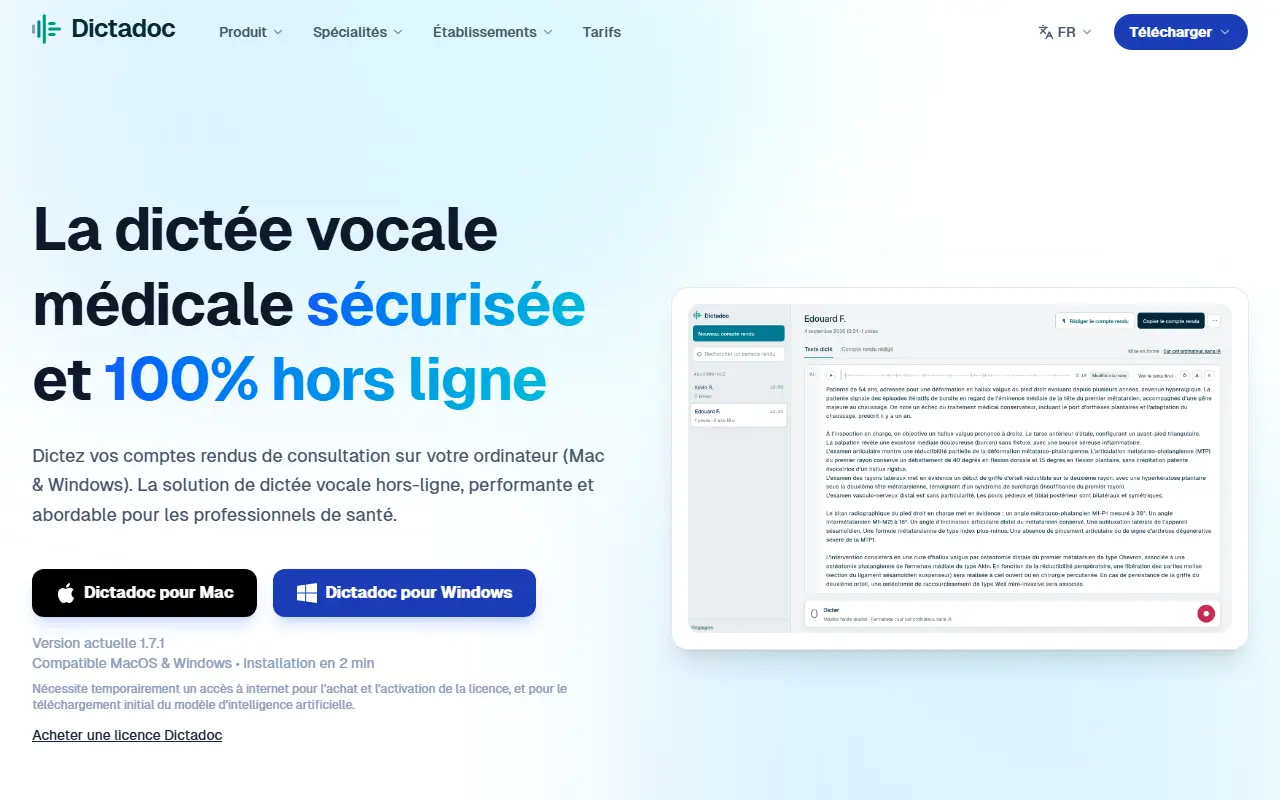
Dictadoc is a French-language medical dictation program for Mac and Windows that works fully offline. You press a key to start dictating, and the text is written wherever your cursor is, so it can be used inside the practice software you already have. The site presents it as a way to save time on writing reports and as an alternative to Dragon Medical.
The product includes voice commands, live text, an editor and a floating panel. The site lists compatibility with Doctolib, Médecin, Weda and Orbis (Agfa), and has pages for dozens of medical specialties, from surgeons and cardiologists to physiotherapists, midwives, dentists and veterinarians. The interface is offered in French, English, German, Italian and Spanish.
For clinics and hospitals there is a Dictadoc Server option that provides dictation on each workstation from a server in your own premises, with installation guides for Windows, macOS or Docker. Pricing for establishments is listed from 490 euros excluding VAT per year, for 5 to 50 workstations.
Key features
- Fully offline voice dictation
- Text written at the cursor in any software
- Voice commands and live text
- Editor and floating panel
- On-premise Dictadoc Server for clinics
- Mac and Windows applications
Good fit for
- Doctors dictating consultation reports
- Clinics keeping dictation on local servers
- Specialists replacing Dragon Medical
Dictadoc: questions and answers
- What is Dictadoc used for?
- Dictadoc is offline voice dictation software for French medical professionals on Mac and Windows, with voice commands, a floating panel and an on-premise server for clinics. It is a good fit for doctors dictating consultation reports, clinics keeping dictation on local servers and specialists replacing Dragon Medical.
- How much does Dictadoc cost?
- Dictadoc is a paid product with no free plan. Establishment plans start at 490 EUR excluding VAT per year for 5 to 50 workstations; other licensing is described on the vendor's tariff page.
- Is Dictadoc open source?
- No. Dictadoc is proprietary (closed-source) software. In the Productivity category, open-source options include BentoPDF, WordCraft and Macro.
- Can I self-host Dictadoc?
- Yes. Although Dictadoc is closed source, it can be self-hosted on your own servers.
- What are some alternatives to Dictadoc?
- Dictadoc competes with Wispr Flow, Dictato and Dictivo.
Open-source alternatives to Dictadoc
See all
BentoPDF
Productivity
The Privacy First PDF Toolkit
AGPL-3.0vs iLovePDF★ 16k
WordCraft
Productivity
An open-source, clean-room reimplementation of Microsoft Word in pure Rust
Apache-2.0vs Microsoft Word★ 18k
Macro
Productivity
Macro is a unified workspace for teams: email, chat, docs, tasks, agents, calls, and CRM —
AGPL-3.0vs Slack★ 6.3k
Stirling PDF
Productivity
A free, private PDF editor you can run on any infrastructure.
OSSvs Adobe Acrobat★ 96k
PowerToys
Productivity
Microsoft PowerToys is a collection of utilities that supercharge productivity and customi
MITvs Alfred★ 141k
Obtainium
Productivity
Get Android app updates straight from the source.
GPL-3.0★ 21k
SaaS alternatives to Dictadoc
See all
Wispr Flow
AI Tools
AI voice dictation app that types into any app
SaaS
Dictato
Productivity
Offline dictation software for Mac that turns speech into text in any app
SaaS
Dictivo
Productivity
Local-first dictation app for macOS and Windows that transcribes speech on-device with Whisper
SaaS
Abridge
AI Tools
AI clinical documentation tool that turns patient conversations into notes
SaaS
Sayline
Productivity
Native macOS menu bar app for private, local speech-to-text dictation into any text field
SaaS
Scrybapp
Productivity
Voice dictation for Mac with translation, running locally on Whisper AI with no cloud
SaaS