About Design Snap
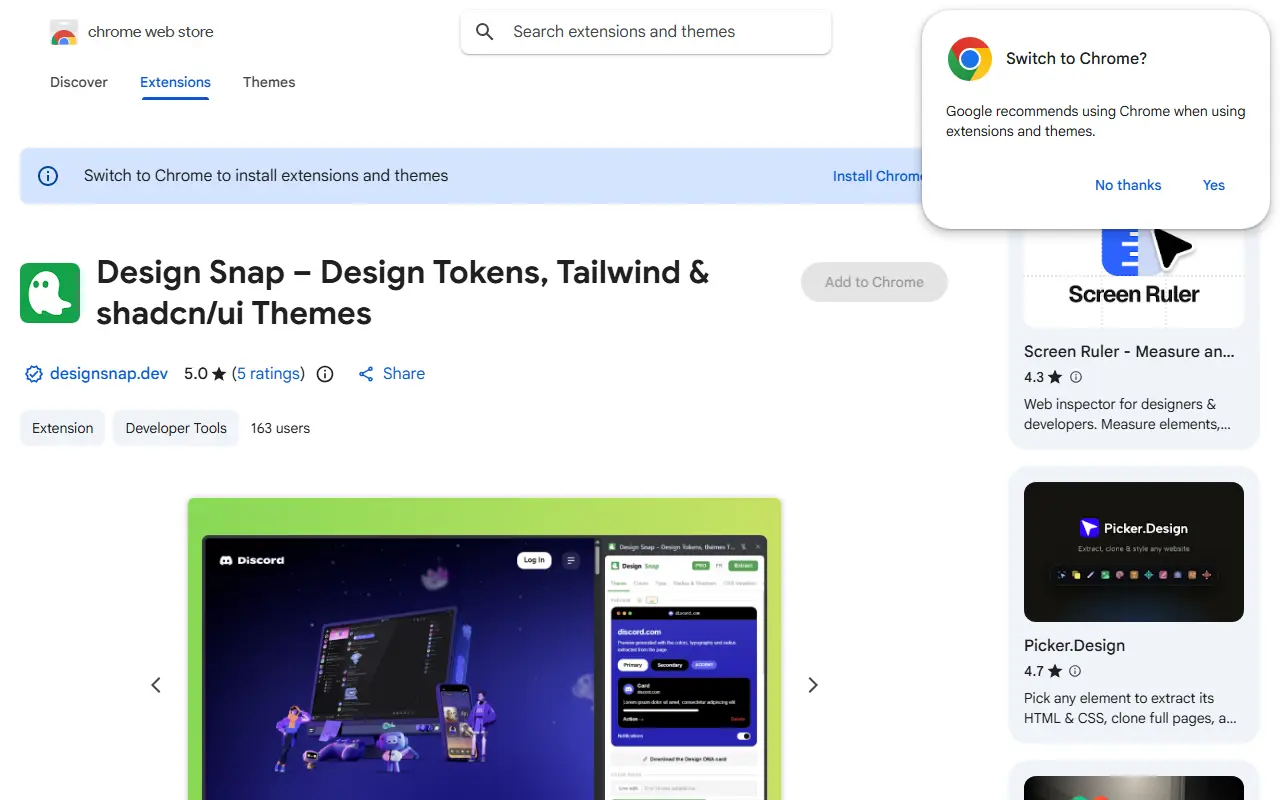
Design Snap is a Chrome extension that helps designers and front-end developers understand and reuse a site's design tokens without digging through DevTools. It analyzes the current page and organizes what it finds into a theme: colors classified by role such as background, foreground, primary, secondary, muted, accent, border and destructive, plus typography, border radius and spacing.
The extension lives in Chrome's side panel, so it stays open while you inspect a page and survives tab switches. A live preview renders a button, card, input and badge using the site's real tokens. Live theme editing redefines the site's own CSS variables so the page repaints as you change a role color, which suits shadcn/ui-style themes. It can generate shadcn/ui and Tailwind themes and inspect the CSS of any element. A keyboard shortcut, Ctrl+Shift+D, opens it.
It is distributed through the Chrome Web Store and published by the owner of designsnap.dev. The listing is categorized under developer tools, and the information available for this entry did not state any pricing.
Key features
- Extracts colors, type, radius and spacing tokens
- Classifies colors by theme role
- Generates shadcn/ui and Tailwind themes
- Live theme editing on the page
- Inspects any element's CSS
- Side panel with keyboard shortcut
Good fit for
- →Reverse-engineering a site's design system
- →Building a theme from a reference website
- Tags
- chrome-extension
- design-tokens
- tailwind
- shadcn-ui
- css-inspector
- devtools
- design
Design Snap: questions and answers
- What is Design Snap used for?
- Design Snap is a Chrome extension that extracts design tokens from any website, exports shadcn/ui and Tailwind themes and inspects element CSS in a side panel. It is a good fit for reverse-engineering a site's design system and building a theme from a reference website.
- Is Design Snap free?
- Yes. Design Snap has a free plan.
- Is Design Snap open source?
- No. Design Snap is proprietary (closed-source) software. In the Developer Tools category, open-source options include TypeUI, Visual Studio Code and Godot.
- What are some alternatives to Design Snap?
- Other SaaS products in the Developer Tools category include Efferd, DepLog and Device Ports.
Open-source alternatives to Design Snap
See all
TypeUI
Developer Tools
Build better UI with AI
OSS★ 2k
Visual Studio Code
Developer Tools
Visual Studio Code
MITvs Sublime Text★ 193k
Godot
Developer Tools
Godot Engine – Multi-platform 2D and 3D game engine
MITvs Unity★ 118k
Windows Terminal
Developer Tools
The new Windows Terminal and the original Windows console host, all in the same place!
MITvs Warp★ 105k
Neovim
Developer Tools
Vim-fork focused on extensibility and usability
OSSvs Sublime Text★ 103k
Zed
Developer Tools
Code at the speed of thought – Zed is a high-performance, multiplayer code editor from the
OSSvs Sublime Text★ 91k
SaaS alternatives to Design Snap
See all
Efferd
Developer Tools
Ready-to-use responsive shadcn UI blocks for web developers
SaaS
DepLog
Developer Tools
Tracks dependency releases across package managers and alerts teams to breaking changes
SaaS
Device Ports
Developer Tools
Desktop app to discover, run and monitor local projects, services, ports and logs
SaaS
JSFiddle
Developer Tools
Online editor for testing and sharing HTML, CSS and JavaScript snippets
SaaS
1DevTool
Developer Tools
Desktop workspace for running several AI coding agents side by side across multiple projects
SaaS
3 Pixel Grid
Developer Tools
Library of tiny animated 3x3 grid indicators with copyable configs for use in your own project
SaaS