About DBC Utility
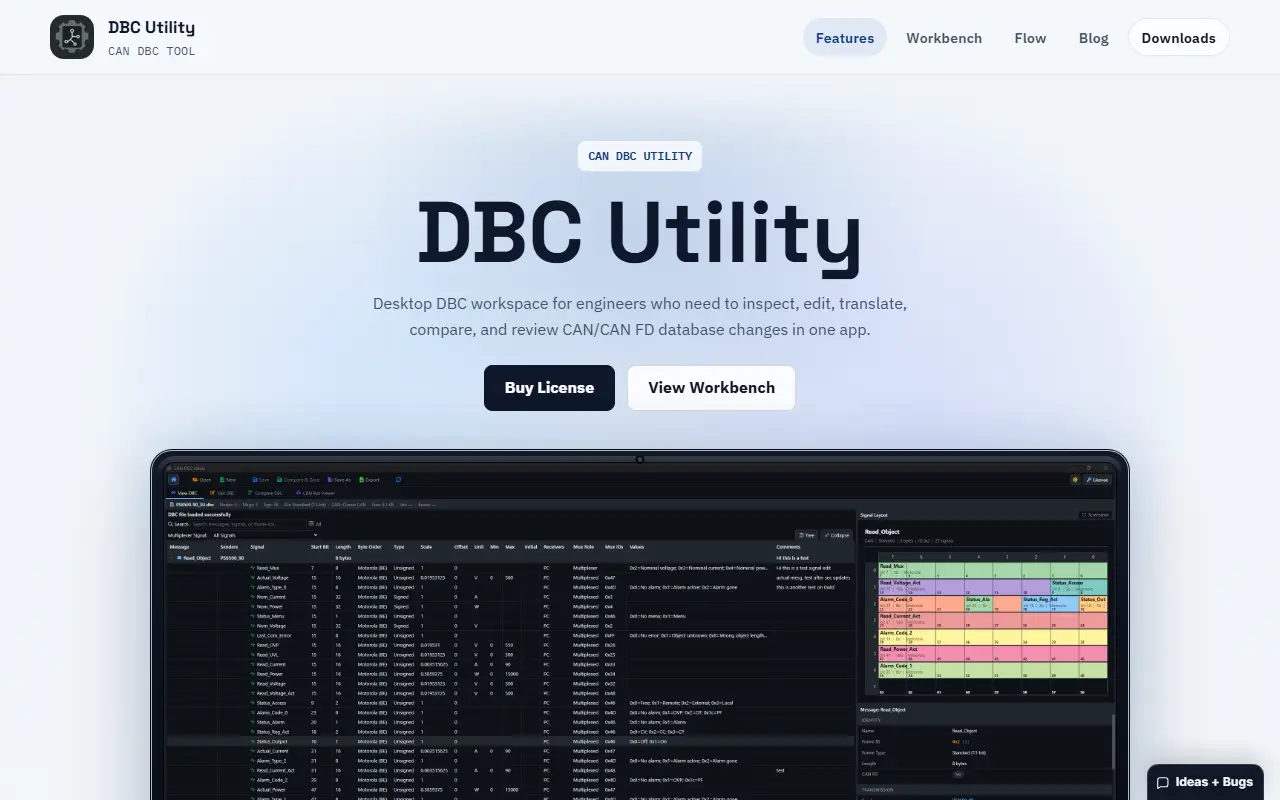
DBC Utility is a desktop workspace for engineers who maintain CAN and CAN FD DBC files, the databases that define messages and signals on a vehicle or embedded bus. It lets you open a database, browse nodes, messages, signals, frame IDs, metadata, and comments, then edit message settings and signal encoding, value choices, receivers, and comments in one application.
Compare views, side-by-side, unified, or structured, help review revisions before saving. The app supports multiplexed messages, with filtering and editing of mux roles, mux signals, and mux IDs, and a layout visualizer shows payload bit packing. It can convert the language of a German DBC to English, or an English DBC to German. It runs on Windows and Linux and is sold as a paid license.
Key features
- Browse messages, signals, and node metadata
- Edit CAN and CAN FD message and signal fields
- Side-by-side, unified, and structured compare
- Editing of multiplexed messages and signals
- Bit layout visualizer for payloads
- German and English DBC translation
Good fit for
- →Automotive engineers reviewing DBC revisions
- →Teams translating DBC documentation between languages
- Tags
- can-bus
- dbc
- automotive
- desktop-app
- embedded
- windows
- linux
DBC Utility: questions and answers
- What is DBC Utility used for?
- DBC Utility is a paid Windows and Linux desktop app for viewing, editing, comparing, validating, and translating CAN and CAN FD DBC database files. It is a good fit for automotive engineers reviewing DBC revisions and teams translating DBC documentation between languages.
- How much does DBC Utility cost?
- DBC Utility is a paid product with no free plan.
- Is DBC Utility open source?
- No. DBC Utility is proprietary (closed-source) software. In the Developer Tools category, open-source options include Ventoy, Windows Terminal and Termux.
Open-source alternatives to DBC Utility
See all
Ventoy
Developer Tools
A new bootable USB solution.
GPL-3.0★ 80k
Windows Terminal
Developer Tools
The new Windows Terminal and the original Windows console host, all in the same place!
MITvs Warp★ 105k
Termux
Developer Tools
Termux - a terminal emulator application for Android OS extendible by variety of packages.
OSS★ 62k
Rufus
Developer Tools
The Reliable USB Formatting Utility
GPL-3.0★ 38k
balenaEtcher
Developer Tools
Flash OS images to SD cards & USB drives, safely and easily.
Apache-2.0★ 34k
Notepad++
Developer Tools
Notepad++ official repository
OSSvs Sublime Text★ 29k
SaaS alternatives to DBC Utility
See all
Qt
Developer Tools
Cross-platform application framework and tooling for desktop, embedded and mobile UIs
SaaS
Tower
Developer Tools
Git client for Mac and Windows with visual history and conflict resolution
SaaS
1DevTool
Developer Tools
Desktop workspace for running several AI coding agents side by side across multiple projects
SaaS
Araxis Merge
Developer Tools
Visual comparison and merging tool for files, folders and documents
SaaS
CLion
Developer Tools
Cross-platform IDE for C and C++ development from JetBrains
SaaS
Crowsnest
Developer Tools
Desktop interface with advanced features for working with AI coding agents
SaaS