
About DB Browser for SQLite
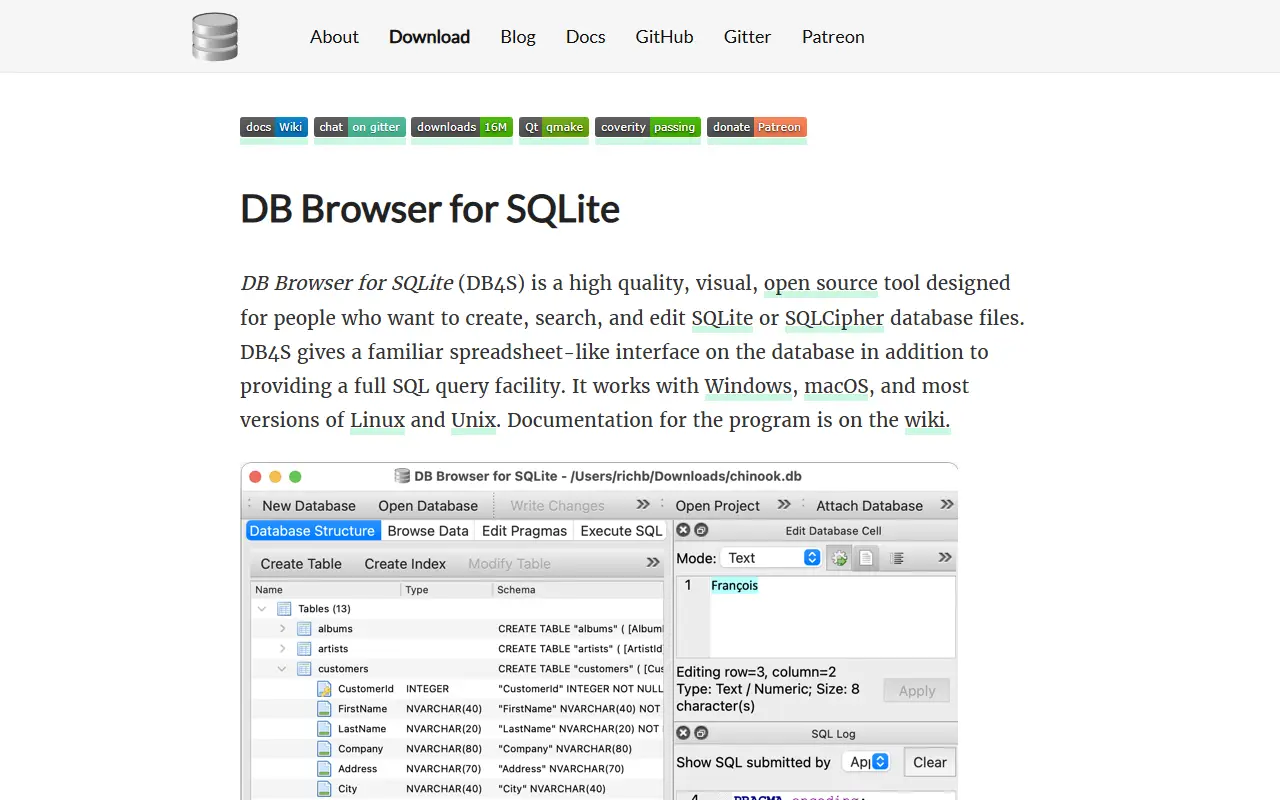
DB Browser for SQLite, often abbreviated DB4S, is a visual, open-source tool for creating, designing and editing database files compatible with SQLite. It is aimed at people who build, query and modify databases and would rather not work purely in the command line, and it uses a familiar spreadsheet-like interface. The project was previously known as SQLite Database Browser.
It is a cross-platform desktop application written in C++ with the Qt toolkit, with builds and nightly versions for Windows, macOS and Linux, including packages for Arch Linux, Debian, Fedora, openSUSE, Ubuntu, FreeBSD, Snap, Nix and Flox. The README also has sections on what the tool is and is not, links to a wiki, build instructions and release history. Chat and donation channels support the community.
The repository's license is listed as 'Other' on GitHub, so check the terms for your use. As a local desktop program there is nothing to host; you open a SQLite file and work with it directly, which makes it popular with developers, students and analysts who handle SQLite databases.
Key features
- Visual editor for SQLite databases
- Spreadsheet-like data browsing
- Create and modify tables and indexes
- Cross-platform Qt application
- Nightly builds and distro packages
- Search and edit records
Good fit for
- →Inspecting SQLite files from apps
- →Teaching database basics
- →Quick data fixes without writing SQL
- Tags
- sqlite
- database-gui
- database-browser
- qt
- cpp
- cross-platform
- desktop-app
- sql
DB Browser for SQLite: questions and answers
- What is DB Browser for SQLite used for?
- DB Browser for SQLite is a visual open-source tool for creating, designing and editing SQLite database files through a familiar spreadsheet-like interface. It is a good fit for inspecting SQLite files from apps, teaching database basics and quick data fixes without writing SQL.
- Is DB Browser for SQLite open source?
- Yes. DB Browser for SQLite is open source under a custom licence. Its source code is on GitHub at sqlitebrowser/sqlitebrowser and is written mainly in C++.
- Is DB Browser for SQLite free?
- Yes. DB Browser for SQLite is open source, so the software itself is free to use under the terms of its own licence.
- What is DB Browser for SQLite an alternative to?
- DB Browser for SQLite is an open-source alternative to TablePlus, Navicat and Base. Other open-source alternatives to TablePlus include Letos, Beekeeper Studio and DBeaver.
- Is DB Browser for SQLite actively maintained?
- Yes. The most recent commit to DB Browser for SQLite was on 1 October 2026, and the latest release is v3.13.1, published on 16 October 2024. The project has 25k stars on GitHub.
Open-source alternatives to DB Browser for SQLite
See all
Letos
Database Tools
A free, open source, multi-platform SQLite database manager.
OSSvs Navicat★ 6.8k
Beekeeper Studio
Database Tools
Modern and easy to use SQL client for MySQL, Postgres, SQLite, SQL Server, and more. Linux
OSSvs DataGrip★ 24k
DBeaver
Database Tools
Free universal database tool and SQL client
Apache-2.0vs DataGrip★ 52k
Outerbase Studio
Database Tools
A lightweight Database GUI in your browser. It supports connecting to Postgres, MySQL, and
AGPL-3.0vs TablePlus★ 6k
DbGate
Database Tools
Database manager for MySQL, PostgreSQL, SQL Server, MongoDB, SQLite and others. Runs under
GPL-3.0vs DataGrip★ 7.3k
TablePro
Database Tools
Free and open source database client built natively for developers
AGPL-3.0vs TablePlus★ 6.2k
SaaS alternatives to DB Browser for SQLite
See all
TablePlus
Database Tools
Native database client for PostgreSQL, MySQL, SQLite, Redis and more
SaaS
Navicat
Database Tools
Database administration and development client for many SQL and NoSQL systems
SaaS
Base
Database Tools
macOS app for creating, browsing and editing SQLite databases
SaaS
DbVisualizer
Database Tools
Universal database client with a free edition and a paid Pro tier
SaaSValentina Studio
Database Tools
Database administration and query tool with a free edition for several database engines
SaaS
Aqua Data Studio
Database Tools
Cross-database IDE with query, visual analytics and data modeling features
SaaS