
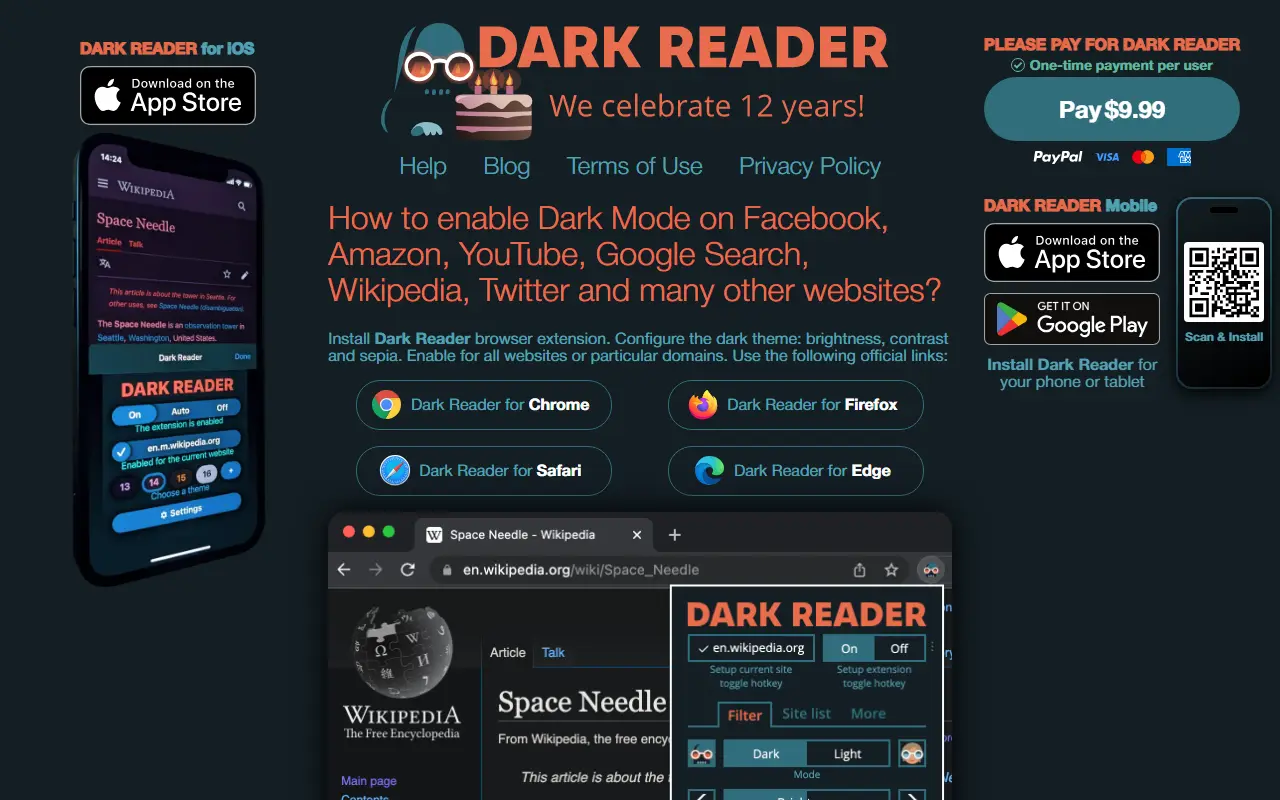
About Dark Reader
Dark Reader is an open-source, MIT-licensed browser extension that analyzes web pages and generates a dark mode for them, aiming to reduce eyestrain while browsing. It is available for Chrome and Firefox, is written in TypeScript, and is customizable in many ways through its interface. The project targets night browsing and accessibility needs.
A help page answers most questions, with GitHub Discussions for anything else. To build it yourself you need Node.js or Deno, with Node.js recommended and Deno support experimental. Running npm install and npm run build produces a zip for Chromium-based browsers and an xpi file for Firefox, and build flags can customize the process. The README also describes bundling with official Firefox store signatures as an experimental option, and contributions are explained in CONTRIBUTING.md.
Key features
- Automatic dark mode for websites
- Customizable brightness and contrast settings
- Chrome and Firefox extension builds
- Page analysis aimed at reducing eyestrain
- Build with Node.js or experimental Deno
- Help page and community discussions
Good fit for
- →Reading websites comfortably at night
- →Dark mode for sites that lack one
- Built with
- TypeScript
- Tags
- dark-mode
- browser-extension
- chrome-extension
- firefox-addon
- accessibility
- eye-care
- night-mode
- typescript
Dark Reader: questions and answers
- What is Dark Reader used for?
- Dark Reader is a browser extension for Chrome and Firefox that generates a customizable dark mode for websites to reduce eyestrain. It is a good fit for reading websites comfortably at night and dark mode for sites that lack one.
- Is Dark Reader open source?
- Yes. Dark Reader is open source under the MIT licence. Its source code is on GitHub at darkreader/darkreader and is written mainly in TypeScript.
- Is Dark Reader free?
- Yes. Dark Reader is open source, so the software itself is free to use.
- Can I self-host Dark Reader?
- Yes. Dark Reader can be self-hosted on your own server or infrastructure; there is no official hosted version.
- What are some alternatives to Dark Reader?
- Similar open-source tools in the Productivity category include Stylebot, Vimium and Univer. SaaS products in the same category include 1 Pixel Workout, AfterFeed and AI Toolbox.
- Is Dark Reader actively maintained?
- Yes. The most recent commit to Dark Reader was on 2 October 2026, and the latest release is v4.9.133, published on 24 September 2026. The project has 22k stars on GitHub.
Open-source alternatives to Dark Reader
See all
Stylebot
Productivity
Change the appearance of the web instantly
MIT★ 1.6kVimium
Productivity
The hacker's browser.
MIT★ 27k
Univer
Productivity
The Office Harness for AI Agents — Spreadsheets, Docs, Slides, Canvas, Relational Tables,
Apache-2.0vs Microsoft Excel★ 22k
Documenso
Productivity
Sign everywhere with Documenso. Build workflows, create templates, and integrate seamlessl
AGPL-3.0vs DocuSign★ 15k
Fluent Reader
Productivity
Modern desktop RSS reader built with Electron, React, and Fluent UI
BSD-3-Clausevs Feedly★ 9.7k
Floccus
Productivity
:cloud: Sync your bookmarks privately across browsers and devices
MPL-2.0★ 8.5k
SaaS alternatives to Dark Reader
See all
1 Pixel Workout
Productivity
Site blocker that swaps distracting scrolling for short 60-second workouts
SaaS
AfterFeed
Productivity
Browser extension that remembers posts you scroll past in social feeds so you can recall them later
SaaS
AI Toolbox
Productivity
Chrome extension adding folders, search, a prompt library and bulk export to ChatGPT, Gemini, Claude and Grok
SaaS
Blur It
Productivity
Censors passwords, emails and sensitive data on your screen before you share it on Zoom, Meet or Loom
SaaS
Blurweb
Productivity
Browser extension that hides sensitive information while screen sharing or recording
SaaS
Droplr
Productivity
Screenshot, screen recording and file sharing tool with instant links for teams
SaaS