
About Visual Center
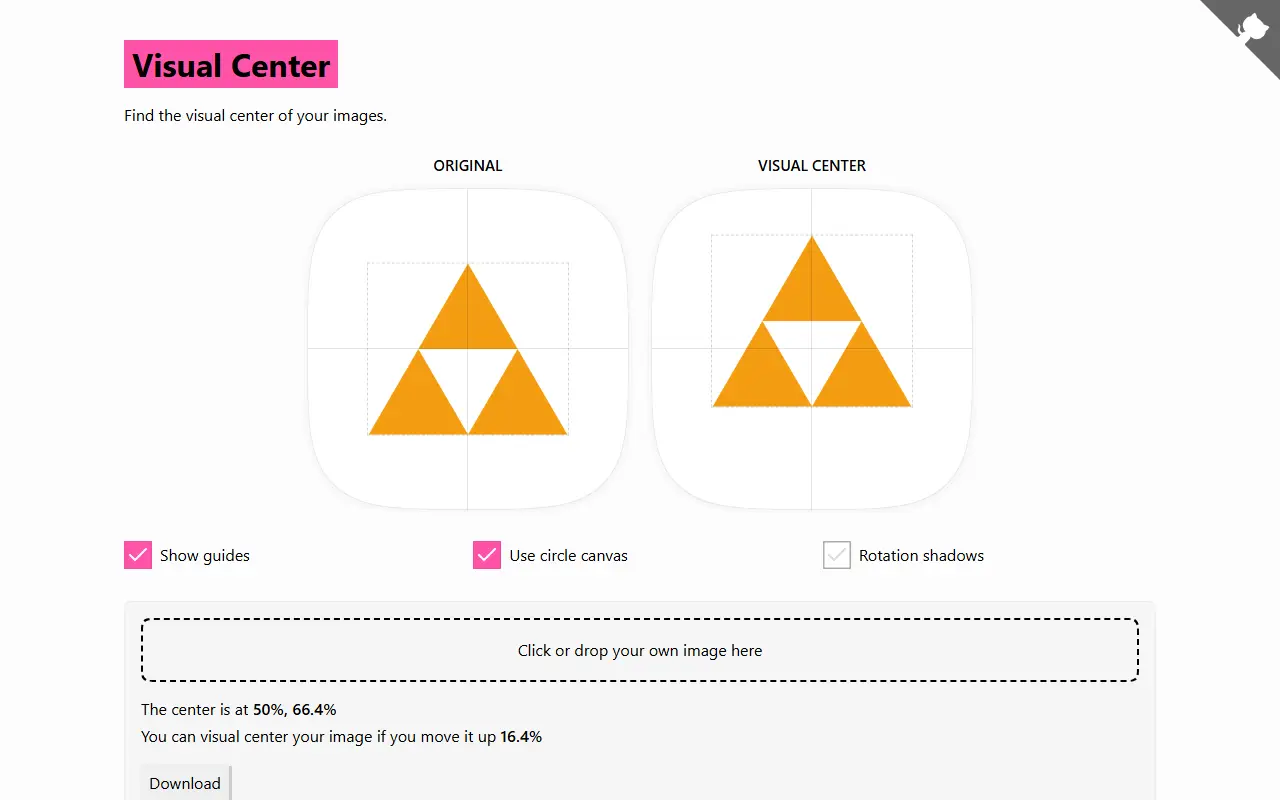
Visual Center, by Javier Bórquez, is a small web tool for aligning logos and images more convincingly in the center of a container. Simply centering the bounding box works for most images, but when visual weight is concentrated on one side an image can feel unbalanced; the tool adds padding so the weight is distributed equally on both axes.
It works by giving every pixel a color difference value relative to the detected background color, then computing a weight for each pixel from its distance to a given coordinate. The visual center is the coordinate where the total weight on each side of both axes is equal. In the web app you can drop your own image, view the original and the corrected version, show guides, use a circular canvas, preview rotation shadows and download the result. The algorithm can also be used programmatically.
Visual Center has been online since 2016 and is licensed under BSD-3-Clause. It is a single-purpose design utility rather than a platform, and the author's site lists other small experiments.
Key features
- Finds the visual center of an image
- Visual weight based on background color difference
- Guides and circular canvas preview
- Rotation shadow preview
- Download of the padded image
- Programmatic usage
Good fit for
- →Centering logos in buttons and badges
- →Balancing icons for rotation or animation
- Built with
- JavaScript
- Tags
- design-tool
- logo
- image-alignment
- javascript
- frontend
- visual-center
- pixel
Visual Center: questions and answers
- What is Visual Center used for?
- Visual Center is a small web tool that finds the visual center of a logo or image so it looks balanced when centered in a container. It is a good fit for centering logos in buttons and badges, and balancing icons for rotation or animation.
- Is Visual Center open source?
- Yes. Visual Center is open source under the BSD-3-Clause licence. Its source code is on GitHub at javierbyte/visual-center and is written mainly in JavaScript.
- Is Visual Center free?
- Yes. Visual Center is open source, so the software itself is free to use. A managed cloud version is also available.
- Can I self-host Visual Center?
- Yes. Visual Center can be self-hosted on your own server or infrastructure.
- What are some alternatives to Visual Center?
- Similar open-source tools in the Design category include Animockup, img2css and OpenPencil. SaaS products in the same category include AI Designer, Jitter and Adobe Creative Cloud.
- Is Visual Center actively maintained?
- Yes. The most recent commit to Visual Center was on 23 August 2026. The project has 1.4k stars on GitHub.
Open-source alternatives to Visual Center
See allAnimockup
Design
Create animated mockups in the browser 🔥
MIT★ 1.9k
img2css
Design
Convert any image to pure CSS. Recreates images using only box-shadows.
BSD-3-Clause★ 2.5k
OpenPencil
Design
The world's first open-source AI-native vector design tool and the first to feature concur
MITvs Figma★ 6.1k
Poster Design
Design
迅排设计 - 图片编辑器、AI 在线海报设计,仿稿定设计,适用于多种场景:海报生成、电商产品图、文章长图、视频/公众号封面等。A beautiful online image de
AGPL-3.0vs Adobe Express★ 4.9k
Doop
Design
The open-source alternative to Paper.design. A multiplayer design canvas where humans and
AGPL-3.0vs Figma★ 789
Liquid Logo
Design
Turn your logo into liquid metal with Paper Shaders
OSS★ 1.2k
SaaS alternatives to Visual Center
See all
AI Designer
Design
AI design platform for UI, logos, brand kits, images and marketing graphics
SaaS
Jitter
Design
Browser-based motion design tool for animated graphics and videos
SaaS
Adobe Creative Cloud
Design
Subscription bundle of Adobe design, photo, video and document apps
SaaS
Adobe Express
Design
Browser and mobile design tool for social graphics and short videos
SaaS
Adobe Fresco
Design
Drawing and painting app from Adobe with raster and vector brushes for tablets
SaaS
Adobe Illustrator
Design
Vector graphics editor for logos, icons and illustration
SaaS