
About Transcribe Video to Text
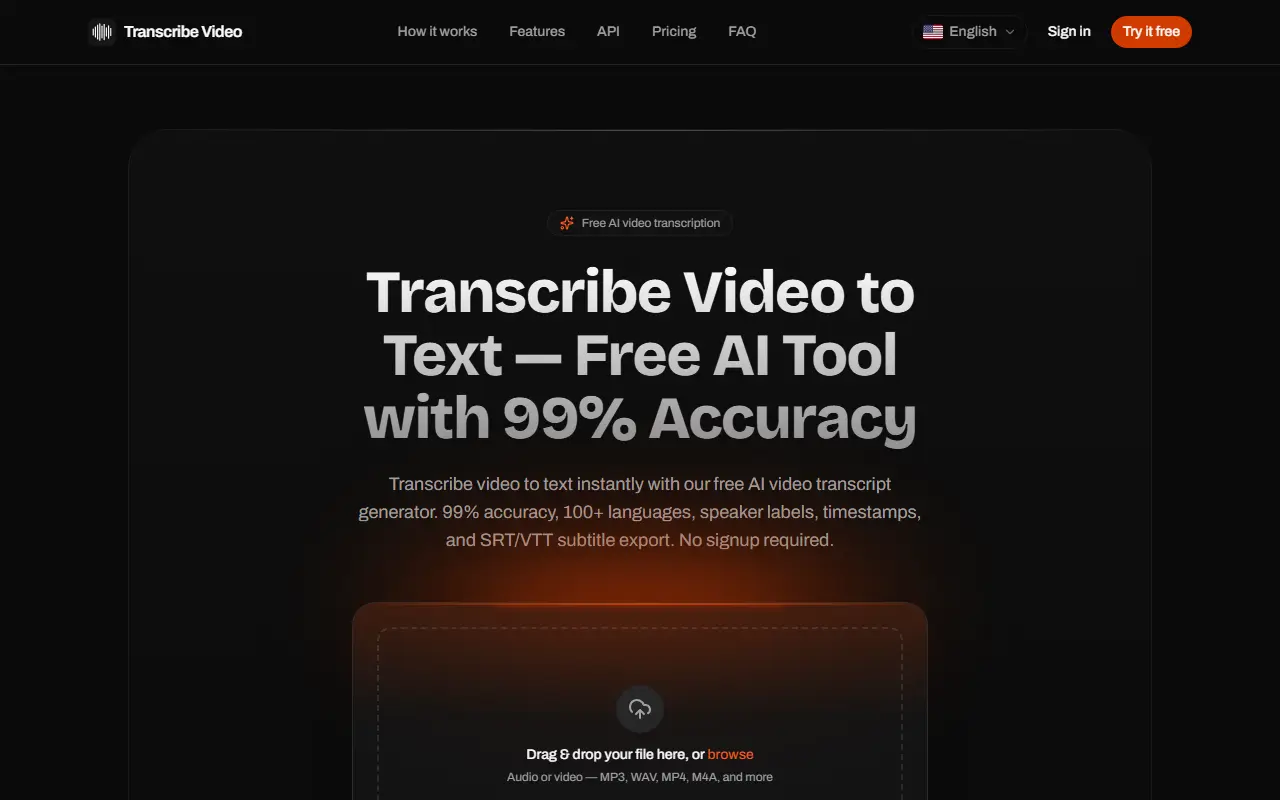
Transcribe Video to Text is a browser-based AI transcript generator. You drag in a video or audio file in formats such as MP4, MOV, WebM, MP3, WAV and M4A, pick a language or let it detect one automatically, and optionally turn on speaker detection. A free preview of the first three minutes needs no signup, and a free account unlocks the full transcript.
Transcripts include speaker labels, word-level timestamps you can click to jump to that moment in playback, and editable text. Subtitles can be exported as SRT or VTT files where you control caption length, line breaks and speaker names, and transcripts as TXT or PDF. The site lists support for over 100 languages and says files are never used to train AI and can be deleted at any time.
Use cases listed include podcasters making show notes, journalists transcribing interviews, students working from lectures, teams capturing meeting decisions and creators adding subtitles. An API and an option for AI agents are also mentioned, and pricing appears in a pricing section.
Key features
- Upload video or audio in 20+ formats
- Automatic speaker labels
- Click-to-play word-level timestamps
- SRT and VTT subtitle export with caption controls
- TXT and PDF transcript export
- 100+ languages with automatic detection
- API access for developers
Good fit for
- Podcast show notes and blog drafts
- Interview transcripts for journalists
- Subtitles for creator videos
Transcribe Video to Text: questions and answers
- What is Transcribe Video to Text used for?
- Transcribe Video to Text is a web tool that converts video and audio files into transcripts, with speaker labels, timestamps, 100+ languages and subtitle or text export to SRT, VTT, TXT and PDF. It is a good fit for podcast show notes and blog drafts, interview transcripts for journalists, and subtitles for creator videos.
- Is Transcribe Video to Text free?
- Yes. Transcribe Video to Text has a free plan. Free preview of the first 3 minutes with no signup; a free account unlocks the full transcript, and paid options are in the pricing section.
- Is Transcribe Video to Text open source?
- No. Transcribe Video to Text is proprietary (closed-source) software and can't be self-hosted. In the AI Tools category, open-source options include Handy, Buzz and Pluely.
- What are some alternatives to Transcribe Video to Text?
- Transcribe Video to Text competes with Rev, Happy Scribe and Otter.ai.
Open-source alternatives to Transcribe Video to Text
See all
Handy
AI Tools
A free, open source, and extensible speech-to-text application that works completely offli
MITvs Wispr Flow★ 33k
Buzz
AI Tools
Buzz transcribes and translates audio offline on your personal computer. Powered by OpenAI
MITvs Otter.ai★ 22k
Pluely
AI Tools
The Open Source Alternative to Cluely - A lightning-fast, privacy-first AI assistant that
GPL-3.0vs Otter.ai★ 2.7k
Tambourine Voice
AI Tools
Your personal voice interface for any app. Speak naturally and your words appear wherever
AGPL-3.0vs Wispr Flow★ 388
ClippedAI
AI Tools
Open-source alternative to OpusClip - AI-powered YouTube Shorts generator. 100% free and u
OSSvs Opus Clip★ 215
Meetily
AI Tools
The most secure and privacy-focused AI meeting note taker. 100% local transcription. Plugg
MITvs Otter.ai★ 31k
SaaS alternatives to Transcribe Video to Text
See all
Rev
AI Tools
Transcription, captioning and AI notetaking service
SaaS
Happy Scribe
AI Tools
Transcription, subtitling and translation service
SaaS
Otter.ai
AI Tools
Meeting transcription, notes and summaries for Zoom, Meet and Teams
SaaS
Notta
AI Tools
Speech-to-text transcription and AI meeting notes in many languages
SaaS
Descript
AI Tools
Edit video and podcasts by editing their transcript, with AI voice and cleanup tools
SaaS
Video to Text
AI Tools
Transcribes video and audio files into text with speaker labels, timestamps and support for 99 languages
SaaS