
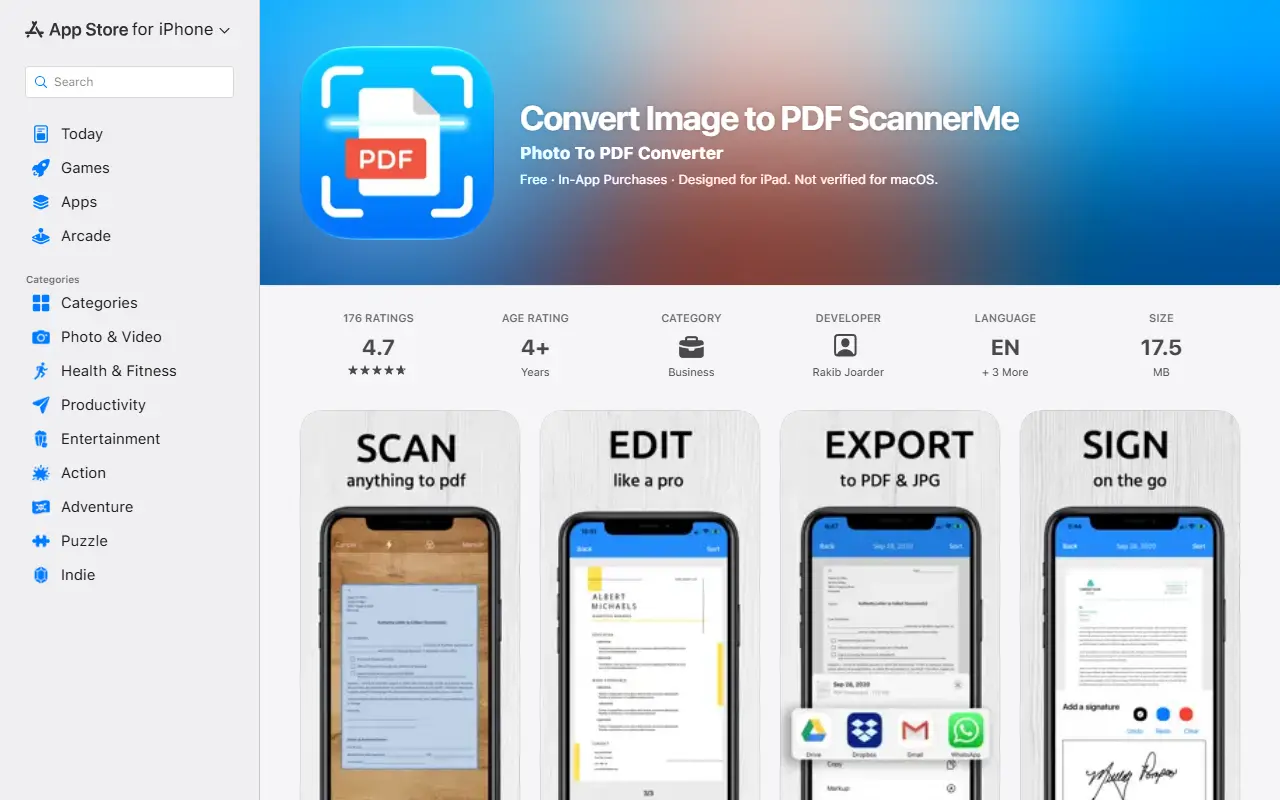
About Scanner ME
Scanner ME, listed as Convert Image to PDF ScannerMe, is an iPhone and iPad app for scanning documents. You place the camera over a page and capture it; the app detects page margins and sections automatically so alignment is handled, and you can save a single page or many pages. A card scanner feature digitizes IDs and passports.
Documents can be organized in folders with search, cropped, rotated, annotated with a chosen color and width, signed and improved with grayscale, black-and-white or auto-enhance filters. The app can edit text on scanned pages, add new text, delete text and highlight, and it converts between image, PDF and document formats for sharing by app, email or folder. Subscription options listed are weekly at $4.99 with a 3-day free trial, monthly at $7.99 and a one-time lifetime payment of $19.99.
Key features
- Automatic page edge detection while scanning
- Folders with search for scanned documents
- Crop, rotate, annotate and sign pages
- Grayscale and auto-enhance filters
- ID and passport card scanner
- Convert and share as PDF or JPG
Good fit for
- Students scanning notes and textbook pages
- Job applicants sharing CVs as PDFs
- Digitizing IDs and receipts
Scanner ME: questions and answers
- What is Scanner ME used for?
- Scanner ME is an iOS document scanner that captures pages, edits and annotates them and converts or shares them as PDF or JPG. It is a good fit for students scanning notes and textbook pages, job applicants sharing CVs as PDFs, and digitizing IDs and receipts.
- How much does Scanner ME cost?
- Scanner ME is a paid product with no free plan. Free to download; weekly $4.99 with a 3-day trial, monthly $7.99, or $19.99 lifetime.
- Is Scanner ME open source?
- No. Scanner ME is proprietary (closed-source) software. In the Productivity category, open-source options include Stirling PDF, DocuSeal and BentoPDF.
- What are some alternatives to Scanner ME?
- Scanner ME competes with Adobe Acrobat, Smallpdf and UPDF.
Open-source alternatives to Scanner ME
See all
Stirling PDF
Productivity
A free, private PDF editor you can run on any infrastructure.
OSSvs Adobe Acrobat★ 94k
DocuSeal
Productivity
Free and Open source tool to streamline document filling and signing. Create custom PDF fo
AGPL-3.0vs DocuSign★ 19k
BentoPDF
Productivity
The Privacy First PDF Toolkit
AGPL-3.0vs iLovePDF★ 16k
Documenso
Productivity
Sign everywhere with Documenso. Build workflows, create templates, and integrate seamlessl
AGPL-3.0vs DocuSign★ 15k
PDFsam
Productivity
PDFsam, a desktop application to split, merge, mix, rotate PDF files and extract pages
AGPL-3.0vs Smallpdf★ 4.6k
OCRmyPDF
Productivity
OCRmyPDF adds an OCR text layer to scanned PDF files, allowing them to be searched
MPL-2.0vs Adobe Acrobat★ 35k
SaaS alternatives to Scanner ME
See all
Adobe Acrobat
Productivity
PDF reader and editor with e-signature and document conversion
SaaS
Smallpdf
Productivity
Browser-based PDF tools for merging, compressing, editing and signing
SaaS
UPDF
Productivity
PDF editor and annotator with AI features for Windows, Mac, iOS and Android
SaaS
PDF Expert
Productivity
PDF reader, annotator and editor for Mac, iPhone and iPad
SaaS
ProperPDF
Productivity
Mobile app to edit, compress and chat with PDFs offline without uploads
SaaS
SoraFiles
Productivity
PDF and image tools that run in your file manager on desktop, processing files locally; web version is free
SaaS