
About MakeUI Design
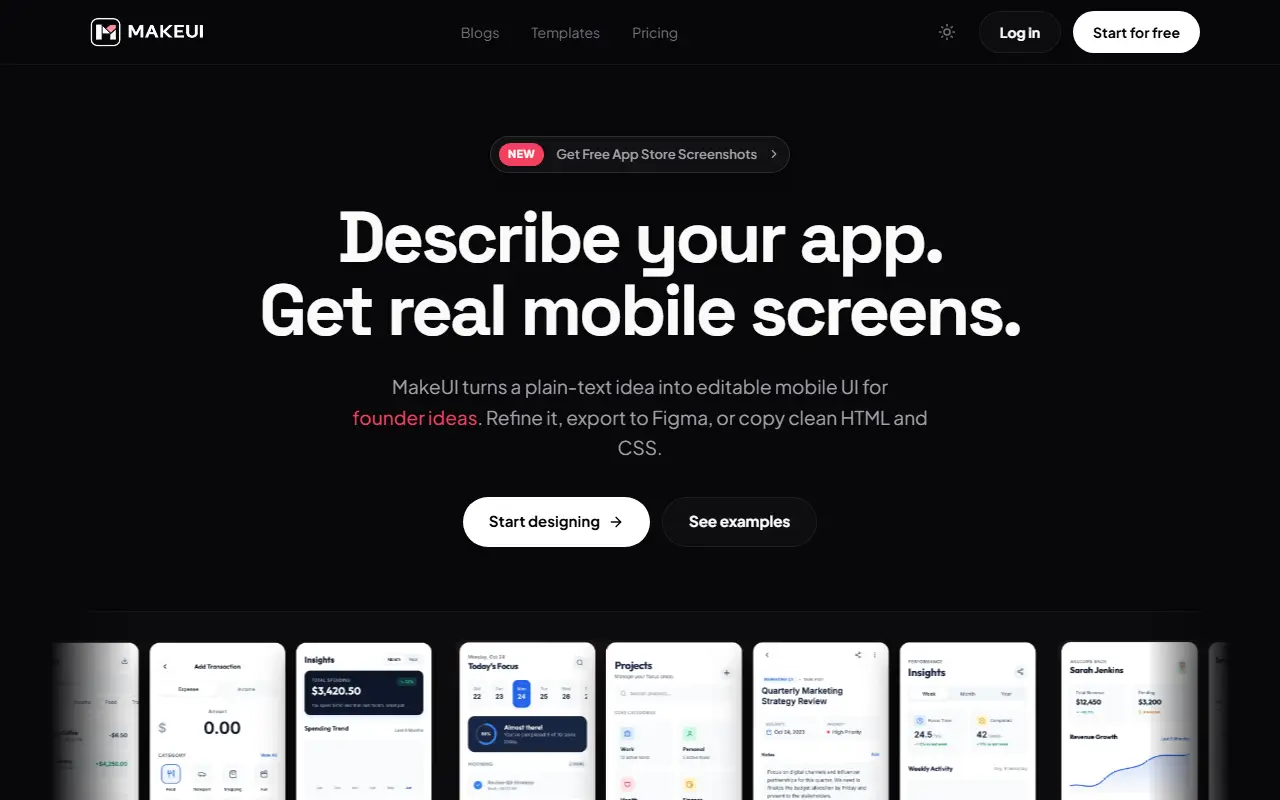
MakeUI generates mobile app screens from a plain-text idea. You describe the product, audience and flow, and it produces complete screens with navigation, cards, forms, empty states and a visual direction, rather than a loose moodboard. The goal is to cover the gap between a written product idea and a screen a team can discuss.
You can review generated layouts, spacing and components, refine them, then move into your workflow in two ways: export to Figma as editable frames for design review, or copy clean HTML and CSS as an implementation starting point. It lets you try outputs from different AI models, including Gemini, Claude and OpenAI, inside one workflow, and there are templates, a blog and a link to free App Store screenshots.
Trial access is limited; upgrading brings a monthly credit allowance, Figma export, a wider choice of models and room for larger volumes. The Indie plan is described as being for solo builders validating app ideas.
Key features
- Mobile screens generated from a text prompt
- Editable Figma frames export
- Copy clean HTML and CSS
- Choice of Gemini, Claude and OpenAI models
- Templates for common app screens
- Theme-aware visual direction
Good fit for
- Solo builders validating app ideas
- Designers starting from a generated mobile layout
MakeUI Design: questions and answers
- What is MakeUI Design used for?
- MakeUI Design is an AI generator that turns a text description of an app into mobile UI screens, which you can edit, export to Figma as layers or copy as HTML and CSS. It is a good fit for solo builders validating app ideas and designers starting from a generated mobile layout.
- Is MakeUI Design free?
- Yes. MakeUI Design has a free plan, and paid plans start at $9.99 per month.
- Is MakeUI Design open source?
- No. MakeUI Design is proprietary (closed-source) software and can't be self-hosted. In the Design category, open-source options include Penpot, OpenPencil and Poster Design.
- What are some alternatives to MakeUI Design?
- MakeUI Design competes with Uizard, Google Stitch and Magic Patterns.
Open-source alternatives to MakeUI Design
See all
Penpot
Design
Penpot: The open-source design platform for Product teams that need scalable collaboration
MPL-2.0vs Figma★ 61k
OpenPencil
Design
Generate complete, multi-screen product interfaces on a live canvas. Refine every layer wi
MITvs Figma★ 6.1k
Poster Design
Design
迅排设计 - 图片编辑器、AI 在线海报设计,仿稿定设计,适用于多种场景:海报生成、电商产品图、文章长图、视频/公众号封面等。A beautiful online image de
AGPL-3.0vs Adobe Express★ 4.9k
Graphite
Design
Community-built comprehensive 2D content creation appplication for graphic design, digital
Apache-2.0vs Affinity★ 27k
Krita
Design
Krita is a free and open source cross-platform application that offers an end-to-end solut
GPL-3.0vs Adobe Photoshop★ 10k
GIMP
Design
Read-only mirror of https://gitlab.gnome.org/GNOME/gimp
OSSvs Adobe Photoshop★ 6.5k
SaaS alternatives to MakeUI Design
See all
Uizard
AI Tools
AI-assisted UI design tool for wireframes and app prototypes
SaaS
Google Stitch
AI Tools
AI tool from Google Labs that generates UI designs and front-end code
SaaS
Magic Patterns
AI Tools
AI design tool that generates UI prototypes and components from prompts
SaaS
Visily
Design
AI-assisted wireframing and UI design tool for non-designers
SaaS
v0
AI Tools
Vercel's AI app builder that generates UI and full-stack code from prompts
SaaS
Figma
Design
Figma is a collaborative design platform for interface design, prototyping, whiteboarding, slides and developer handoff, with AI and code tools.
SaaS