
About Cool Free Tools
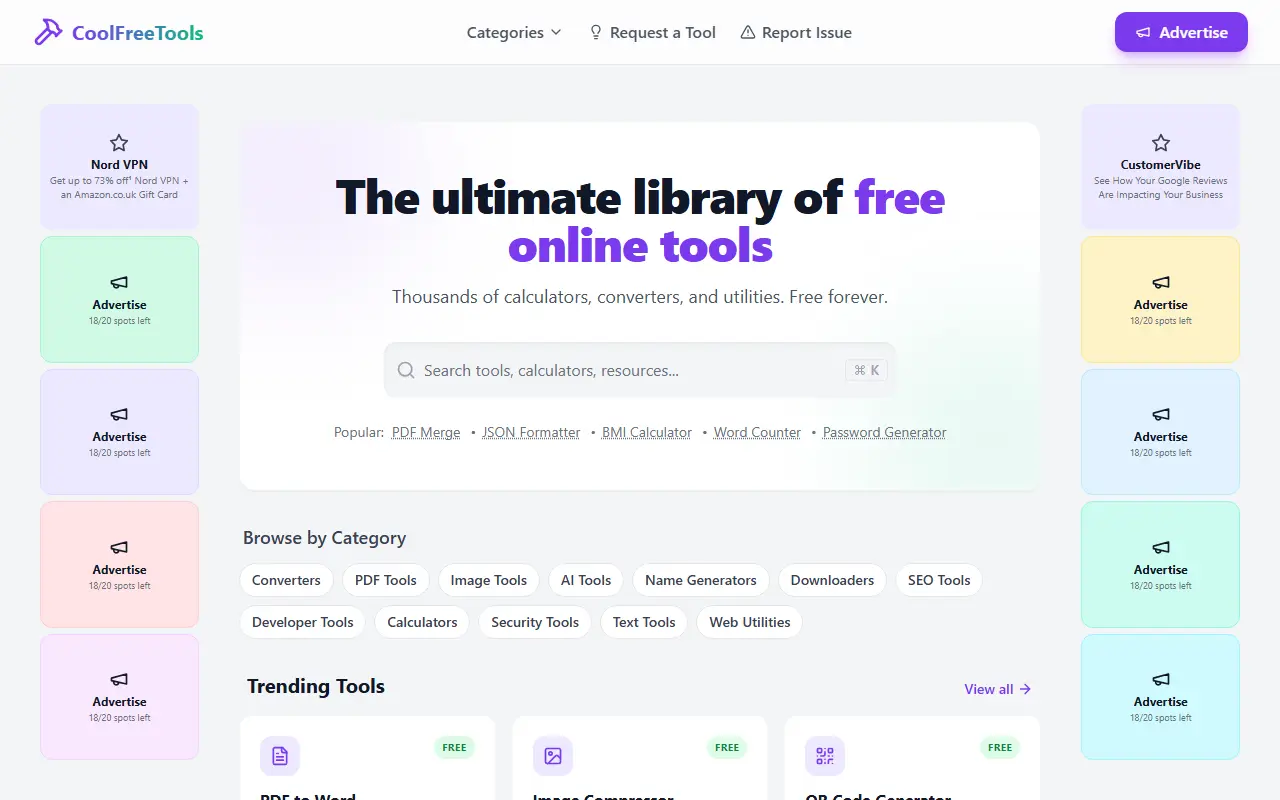
CoolFreeTools is a large collection of small web utilities that run in the browser. It groups them into categories such as converters, PDF tools, image tools, AI tools, name generators, downloaders, SEO tools, developer tools, calculators, security tools, text tools and web utilities, so you can find a quick one-off tool without installing software.
Examples shown on the homepage include PDF to Word, PDF merge, an image compressor, a QR code generator, a JSON formatter, a BMI calculator, a word counter and a password generator. There is a search box, a list of trending and newly added tools, and links to request a new tool or report an issue. The site states that tools need no signup and are free.
CoolFreeTools is a hosted site funded by advertising, and it offers advertising placement to others. There is no self-hosted version.
Key features
- Searchable library of free online utilities
- PDF merge and PDF to Word conversion
- Image compressor and QR code generator
- JSON formatter and other developer tools
- Calculators and password generator
- Request a tool or report an issue
Good fit for
- →Quick one-off file conversions
- →Everyday calculators and text utilities
- Tags
- online-tools
- converters
- calculators
- pdf-tools
- image-tools
- developer-tools
- utilities
- free
Cool Free Tools: questions and answers
- What is Cool Free Tools used for?
- Cool Free Tools is a browser-based library of free calculators, converters and utilities covering PDF, image, developer, SEO and security tasks without signup. It is a good fit for quick one-off file conversions, and everyday calculators and text utilities.
- Is Cool Free Tools free?
- Yes. Cool Free Tools is free to use.
- Is Cool Free Tools open source?
- No. Cool Free Tools is proprietary (closed-source) software and can't be self-hosted. In the Productivity category, open-source options include OmniTools, PowerToys and Stats.
- What are some alternatives to Cool Free Tools?
- Other SaaS products in the Productivity category include Bytesweep, Canabee and Chat Backup Reader.
Open-source alternatives to Cool Free Tools
See all
OmniTools
Productivity
Self-hosted collection of powerful web-based tools for everyday tasks. No ads, no tracking
MITvs iLovePDF★ 10k
PowerToys
Productivity
Microsoft PowerToys is a collection of utilities that supercharge productivity and customi
MITvs Alfred★ 139k
Stats
Productivity
macOS system monitor in your menu bar
MIT★ 42k
Rectangle
Productivity
Move and resize windows on macOS with keyboard shortcuts and snap areas
OSSvs BetterTouchTool★ 30k
PDFsam
Productivity
PDFsam, a desktop application to split, merge, mix, rotate PDF files and extract pages
AGPL-3.0vs Smallpdf★ 4.6k
Stirling PDF
Productivity
A free, private PDF editor you can run on any infrastructure.
OSSvs Adobe Acrobat★ 93k
SaaS alternatives to Cool Free Tools
See all
Bytesweep
Productivity
Desktop disk space analyzer for macOS and Linux that finds reclaimable data such as Docker images and Xcode caches
SaaS
Canabee
Productivity
Cooking and dosing app with infused recipes, strain profiles, dose tracking and an AI kitchen assistant
SaaS
Chat Backup Reader
Productivity
iOS app for backing up and reading WhatsApp messages
SaaS
ClaudeUsageBar
Productivity
macOS menu bar app that shows your Claude and Claude Code usage limits at a glance
SaaS
ClearCut
Productivity
Native macOS utility with 45 local tools for converting and compressing video, audio, images and PDFs
SaaS
DeskUtils
Productivity
macOS menu bar app with clipboard history, screenshots, OCR, color picker and display controls
SaaS