
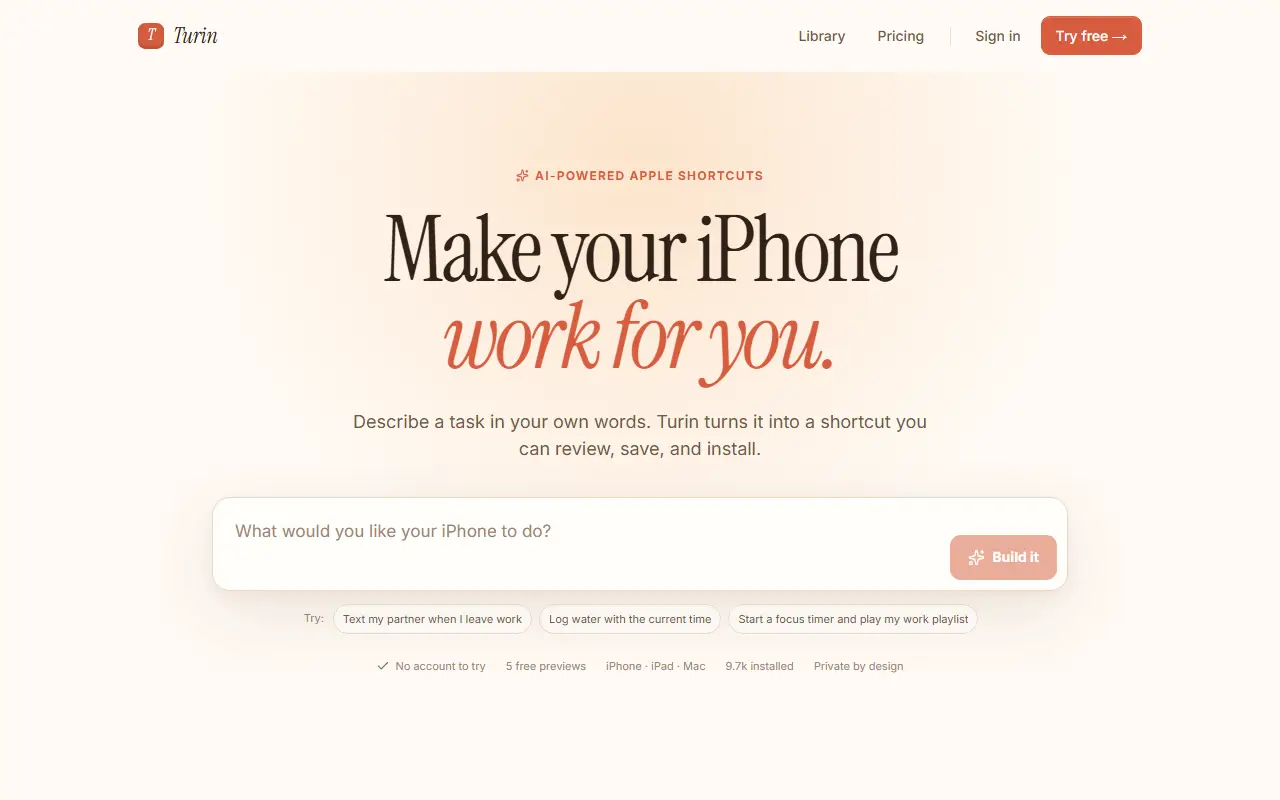
About Turin
Turin generates Apple Shortcuts from a description. You type or speak a task such as logging water with the current time or texting a partner when you leave work, Turin wires up the actions, lets you review exactly what it built, and installs the .shortcut file into the Shortcuts app with one tap. The shortcut keeps working after installation even if your credit balance reaches zero.
Alongside generation there is a library of community shortcuts to browse and install, for productivity, communication, utilities and health, and shortcuts can be edited and remixed after install. The site contrasts this with asking a chatbot, which can describe a workflow but not produce an installable file. Turin targets Shortcuts on iPhone, iPad and Mac, with compatibility depending on the actions and OS version.
The Free plan builds one AI shortcut each day with up to 5 builder messages and needs no card. Beyond that you add prepaid credit with no subscription or expiry, charged by actual model usage plus a 0.1 credit compile fee when a shortcut is stored.
Key features
- Plain-English shortcut generation
- Review of exact actions before install
- Real .shortcut file with one-tap install
- Community shortcut library
- Editable and remixable after install
- Pay-as-you-go credit with no expiry
Good fit for
- Building a personal automation without learning Shortcuts
- Installing community shortcuts for daily tasks
Turin: questions and answers
- What is Turin used for?
- Turin is an AI builder for Apple Shortcuts that turns a plain-English description into a real .shortcut file you can review and install on iPhone, iPad or Mac. It is a good fit for building a personal automation without learning Shortcuts and installing community shortcuts for daily tasks.
- Is Turin free?
- Yes. Turin has a free plan. Free plan builds 1 AI shortcut per day with no card; pay-as-you-go prepaid credit never expires and there is no subscription.
- Is Turin open source?
- No. Turin is proprietary (closed-source) software and can't be self-hosted. In the Workflow Automation category, open-source options include Automa, Skyvern and AstronRPA.
- What are some alternatives to Turin?
- Other SaaS products in the Workflow Automation category include Apple Shortcuts, Hachigo and IFTTT.
Open-source alternatives to Turin
See all
Automa
Workflow Automation
A browser extension for automating your browser by connecting blocks
OSSvs Bardeen★ 22k
Skyvern
Workflow Automation
Automate browser based workflows with AI
AGPL-3.0vs Browse AI★ 23k
AstronRPA
Workflow Automation
Agent-ready RPA suite with out-of-the-box automation tools. Built for individuals and ente
Apache-2.0vs UiPath★ 5.3k
Refly
Workflow Automation
The first open-source agent skills builder. Define skills by vibe workflow, run on Claude
OSSvs Gumloop★ 7.5k
Automatisch
Workflow Automation
The open source Zapier alternative. Build workflow automation without spending time and mo
OSSvs Zapier★ 14k
StackStorm
Workflow Automation
StackStorm (aka "IFTTT for Ops") is event-driven automation for auto-remediation, incident
Apache-2.0vs Tines★ 6.5k
SaaS alternatives to Turin
See all
Apple Shortcuts
Workflow Automation
Automation app built into iOS, iPadOS and macOS for chaining actions across apps
SaaS
Hachigo
Workflow Automation
AI workflow builder that turns a plain-English description of a task into a repeatable automation
SaaS
IFTTT
Workflow Automation
Applet-based automation service linking apps, smart devices and web services
SaaS
Suprclaw
Workflow Automation
App to automate tasks and build your own AI workforce using agents, skills and tools
SaaS
Albato
Workflow Automation
No-code automation platform connecting business apps with prebuilt integrations
SaaS
Browse AI
Workflow Automation
No-code web scraper and site monitor trained by recording actions in a browser
SaaS