About toPDF
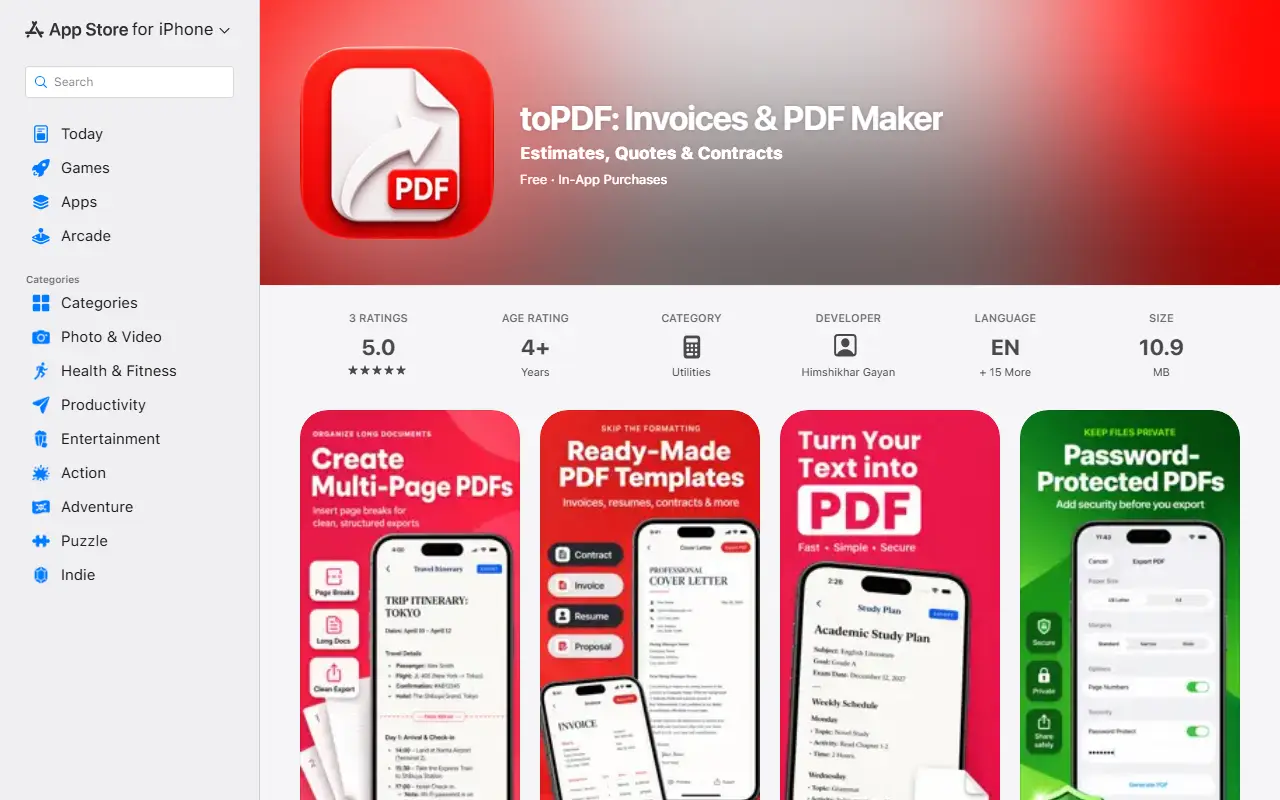
toPDF turns client details and everyday writing into PDF documents on the iPhone, with iPad and Mac listed as supported devices. You start from an invoice or a template, adjust the content and preview the pages before exporting and sharing. Documents are saved on the device and no account is needed to start.
Invoices and estimates can list items with quantities and prices, plus tax, discounts and payment terms, and an estimate can be converted into an invoice. Business and client details can be saved for reuse. Ready-made templates include meeting notes, study plans, resumes, cover letters, proposals and freelance contracts, and a blank page is also available. Export offers A4 or US Letter, margins and page numbers. The app is free with in-app purchases, and Pro removes watermarks and adds business branding such as a logo and tax ID, plus password protection.
Key features
- Invoices and estimates with line items and tax
- Convert an estimate into an invoice
- Templates for proposals and contracts
- PDF preview before export
- A4 or US Letter with page numbers
- Saved business and client details
- Pro watermark-free export and password protection
Good fit for
- Freelancers invoicing clients from a phone
- Drafting quotes and estimates on the go
- Making contracts and cover letters as PDFs
toPDF: questions and answers
- What is toPDF used for?
- toPDF is an iPhone and iPad app for creating invoices, estimates and document templates and exporting them as PDFs, with a Pro tier for branding and password protection. It is a good fit for freelancers invoicing clients from a phone, drafting quotes and estimates on the go, and making contracts and cover letters as PDFs.
- Is toPDF free?
- Yes. toPDF has a free plan.
- Is toPDF open source?
- No. toPDF is proprietary (closed-source) software. In the Productivity category, open-source options include Stirling PDF, DocuSeal and BentoPDF.
- What are some alternatives to toPDF?
- toPDF competes with Smallpdf and iLovePDF.
Open-source alternatives to toPDF
See all
Stirling PDF
Productivity
A free, private PDF editor you can run on any infrastructure.
OSSvs Adobe Acrobat★ 94k
DocuSeal
Productivity
Free and Open source tool to streamline document filling and signing. Create custom PDF fo
AGPL-3.0vs DocuSign★ 19k
BentoPDF
Productivity
The Privacy First PDF Toolkit
AGPL-3.0vs iLovePDF★ 16k
Documenso
Productivity
Sign everywhere with Documenso. Build workflows, create templates, and integrate seamlessl
AGPL-3.0vs DocuSign★ 15k
NetNewsWire
Productivity
RSS reader for macOS and iOS.
MITvs Feedly★ 10k
Solidtime
Productivity
The modern Open-Source Time Tracker for Freelancers and Agencies. Manage Projects, Tasks,
AGPL-3.0vs Clockify★ 9k
SaaS alternatives to toPDF
See all
Smallpdf
Productivity
Browser-based PDF tools for merging, compressing, editing and signing
SaaS
iLovePDF
Productivity
Online PDF tools for splitting, merging, compressing and converting
SaaS
AI PDF Studio
Productivity
Online PDF creation and editing assisted by AI
SaaS
PDF Editify
Productivity
Online tool to fill, sign and edit PDFs
SaaS
PDF Expert
Productivity
PDF reader, annotator and editor for Mac, iPhone and iPad
SaaS
Pics2PDF
Productivity
iOS app that converts photos into PDF, JPG or PNG files in seconds
SaaS