 TrackMedia
 TrackRev

About ThoughtDAG
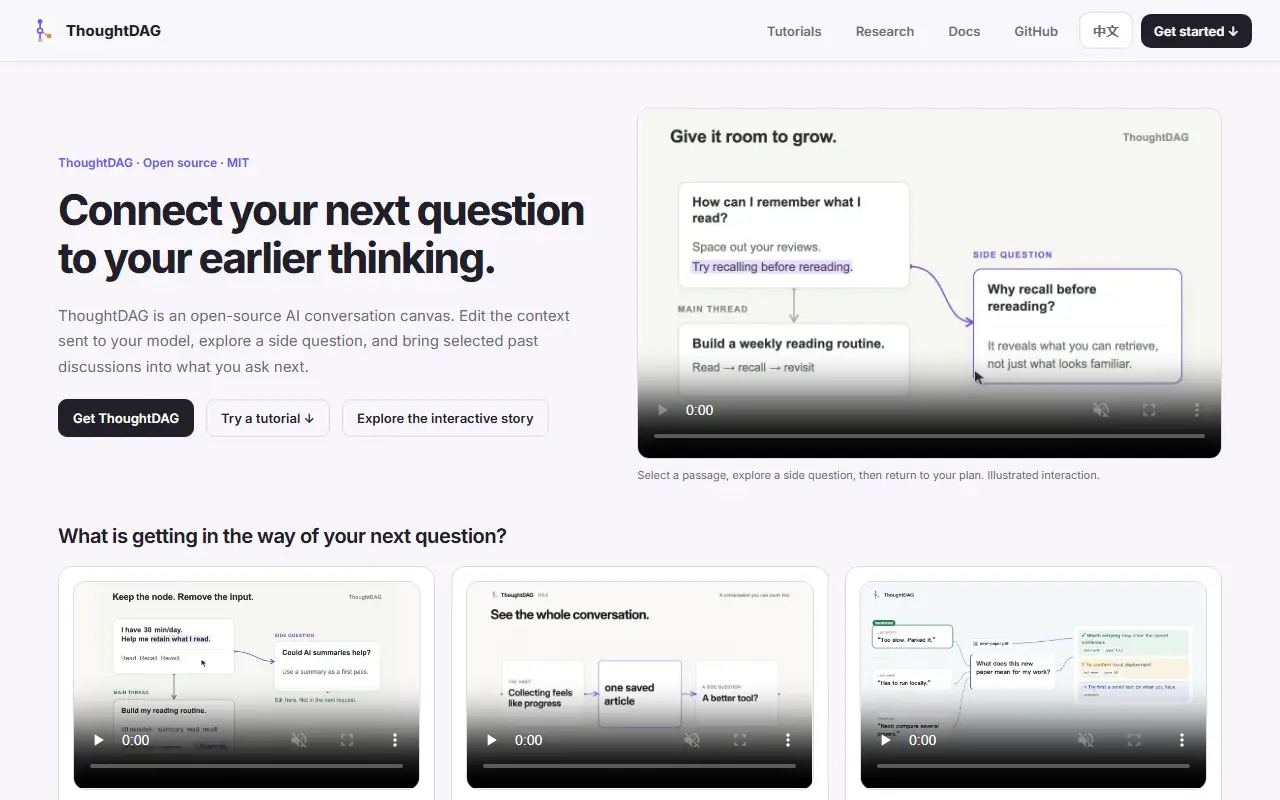
ThoughtDAG, published under the chenxiachan account, turns conversations with large language models into an editable graph on an infinite canvas. Each exchange becomes a node, and the wires between nodes define the context the model sees, so you can explore a side question and then choose which paths to connect.
Version 0.5 adds local recall: an index searches earlier agent sessions and ThoughtDAG canvases, builds topic dossiers of decisions and open questions, and lists the excerpts added to a request so you can inspect or exclude them. An optional decision layer called Jev helps pick relevant material, and without it recall falls back to rules.
The project offers a desktop app, a command line interface and a harness, and its topics point to MCP support, Ollama for local models, local-first storage and a self-hosted option. It is built with TypeScript and React Flow and is MIT licensed.
Key features
- Infinite canvas of branching LLM conversations
- Wires control which context reaches the model
- Local index of past agent sessions
- Topic dossiers with links to sources
- Inspect and exclude recalled excerpts
- Desktop app and command line interface
- MCP and Ollama integration
Good fit for
- Research that branches across side questions
- Managing context for long LLM projects
ThoughtDAG: questions and answers
- What is ThoughtDAG used for?
- ThoughtDAG is an infinite-canvas tool where AI conversations branch into nodes, letting you control which context each wire passes to the language model. It is a good fit for research that branches across side questions and managing context for long LLM projects.
- Is ThoughtDAG open source?
- Yes. ThoughtDAG is open source under the MIT licence. Its source code is on GitHub at chenxiachan/thoughtdag and is written mainly in TypeScript.
- Is ThoughtDAG free?
- Yes. ThoughtDAG is open source, so the software itself is free to use.
- Can I self-host ThoughtDAG?
- Yes. ThoughtDAG can be self-hosted on your own server or infrastructure.
- What are some alternatives to ThoughtDAG?
- Similar open-source tools in the AI Tools category include Open WebUI, Cherry Studio and BrowserOS. SaaS products in the same category include Rabbit Holes AI, Download YouTube Transcripts and FlowLeap.
- Is ThoughtDAG actively maintained?
- Yes. The most recent commit to ThoughtDAG was on 8 November 2026, and the latest release is v0.5.28, published on 8 November 2026. The project has 775 stars on GitHub, with 166 added in the last 30 days.
Open-source alternatives to ThoughtDAG
See all
Open WebUI
AI Tools
Run AI on your own terms. Connect any model, extend with code, and protect what matters wi
OSSvs ChatGPT★ 158k
Cherry Studio
AI Tools
AI productivity studio with smart chat, autonomous agents, and 300+ assistants. Unified ac
AGPL-3.0vs ChatGPT★ 53k
BrowserOS
AI Tools
BrowserOS neo, formerly BrowserClaw, is a local, open-source browser your AI agents (Claud
AGPL-3.0vs Perplexity★ 14k
PapersGPT for Zotero
AI Tools
A powerful Zotero AI and MCP plugin with ChatGPT, Gemini 3.7, Claude Fable 5, Claude Opus
AGPL-3.0vs Elicit★ 2.7k
Better Chatbot
AI Tools
Formerly Better Chatbot. Navigator is an open-source AI workspace for agents, MCP and work
MITvs ChatGPT★ 1.2k
Browser Operator
AI Tools
Browser Operator - The AI browser with built in Multi-Agent platform! Open source alternat
BSD-3-Clausevs ChatGPT★ 513
SaaS alternatives to ThoughtDAG
See all
Rabbit Holes AI
AI Tools
App for chatting with AI models on an infinite canvas, running many sessions side by side
SaaS
Download YouTube Transcripts
AI Tools
Extracts transcripts from YouTube videos, full channels and playlists in bulk
SaaS
FlowLeap
AI Tools
Desktop workspace with a patent-trained agent that searches patent databases live and drafts cited patent documents
SaaS
Google Gemini
AI Tools
Google AI assistant for chat, writing, coding, research and image generation
SaaS
NanthAI Edge
AI Tools
Cross-platform AI workspace for comparing 300+ models, research and Word, Excel and PowerPoint creation
SaaS
Ollamac Pro
AI Tools
Native macOS workspace for Ollama with local LLMs, documents, images, projects and MCP tools
SaaS