
About Pikstrapi
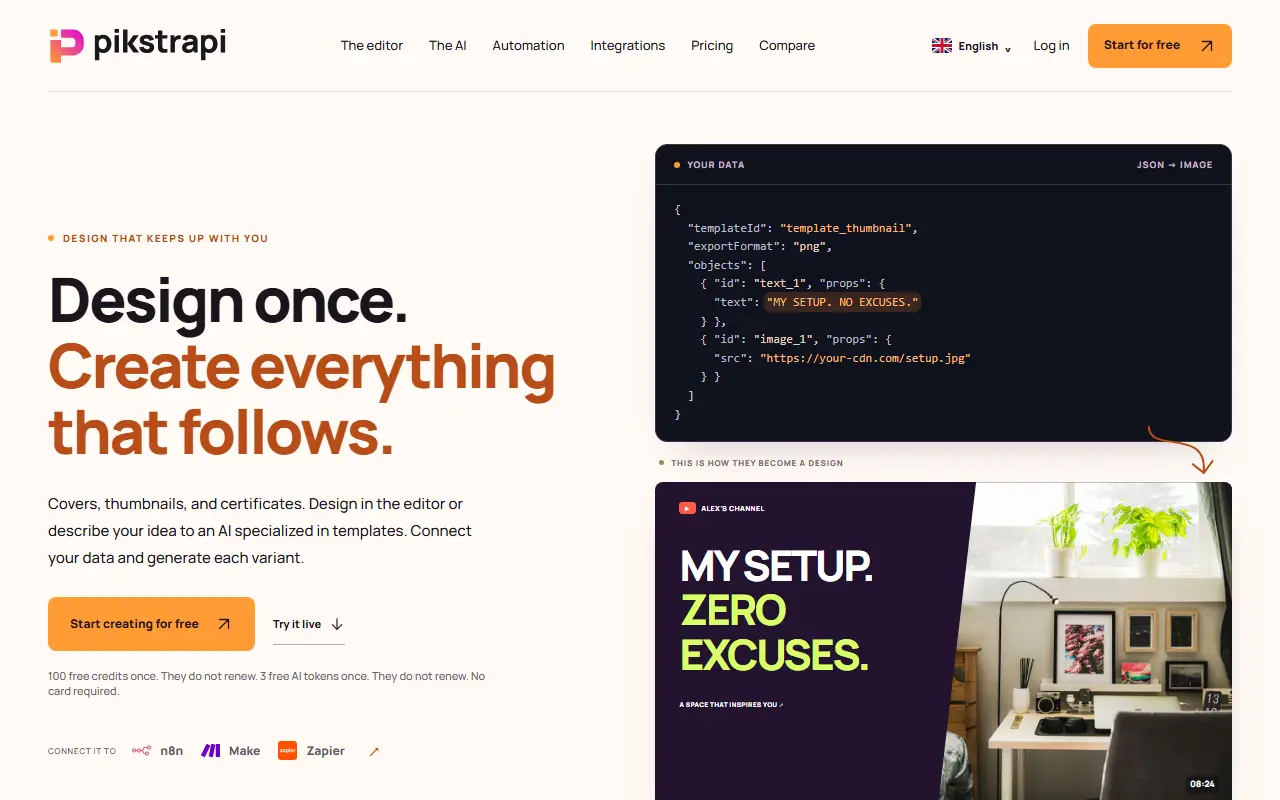
Pikstrapi lets you design an image template once and then produce every variant from data. You build the template in a visual editor with text, images and shapes, or describe the idea to an AI specialized in templates that generates the canvas and validates it. You then send a JSON request naming the template and the values to fill in, or upload a CSV in which each row becomes one image.
Output formats are PNG, JPG, WEBP, SVG and PDF, and results can be delivered to a webhook of your choice. It connects with automation tools such as n8n, Make and Zapier. The site gives examples such as blog covers, video thumbnails and course completion certificates, and an interactive demo lets you change the data and see the result.
New accounts get 100 free credits and 3 free AI tokens, given once and not renewed, with no card required. Paid plans are in the pricing section. The site also has pages on integrations and a comparison with other tools.
Key features
- Visual template editor
- AI template generation from a description
- Image generation through a JSON API
- CSV rows to one image each
- Export to PNG, JPG, WEBP, SVG and PDF
- Webhook delivery of results
- n8n, Make and Zapier integrations
Good fit for
- Generating blog cover images from article titles
- Producing course certificates for each student
- Creating video thumbnails in a consistent style
Pikstrapi: questions and answers
- What is Pikstrapi used for?
- Pikstrapi combines a visual design editor with an API so one template can produce many images from CSV rows, JSON data and webhooks. It is a good fit for generating blog cover images from article titles, producing course certificates for each student and creating video thumbnails in a consistent style.
- Is Pikstrapi free?
- Yes. Pikstrapi has a free plan, and paid plans start at €10 per month.
- Is Pikstrapi open source?
- No. Pikstrapi is proprietary (closed-source) software and can't be self-hosted. In the Design category, open-source options include Penpot, Graphite and vue-fabric-editor.
- What are some alternatives to Pikstrapi?
- Pikstrapi competes with Canva, Cloudinary and imgix.
Open-source alternatives to Pikstrapi
See all
Penpot
Design
Penpot: The open-source design platform for Product teams that need scalable collaboration
MPL-2.0vs Figma★ 61k
Graphite
Design
Community-built comprehensive 2D content creation appplication for graphic design, digital
Apache-2.0vs Affinity★ 27k
vue-fabric-editor
Design
快图设计-基于fabric.js和Vue的开源图片编辑器,可自定义字体、素材、设计模板。fabric.js and Vue based image editor, can cust
MITvs Photopea★ 8k
Synfig Studio
Design
This is the Official source code repository of Synfig Studio animation software
GPL-3.0vs Adobe After Effects★ 2.3k
Maptoposter Online
Design
✨❤️🔥Turn the cities you love into stunning designs
MIT★ 950
Liquid Logo
Design
Turn your logo into liquid metal with Paper Shaders
OSS★ 1.2k
SaaS alternatives to Pikstrapi
See all
Canva
Design
Online design tool for social graphics, presentations, video and print
SaaS
Cloudinary
Media & Streaming
Image and video management platform with transformations, optimization and CDN delivery
SaaS
imgix
Photos & Images
Image processing and delivery CDN with an API for on-the-fly transformations
SaaS
Previewly
Design
Creates Open Graph link-preview images for your SaaS from a logo and short description using AI
SaaS
Convitede
Design
Create editable, shareable digital invitations for birthdays, weddings, graduations and other events
SaaS
Envato Elements
Design
Subscription library of stock assets, templates, fonts and music for creative projects
SaaS