
About EverythingWeather
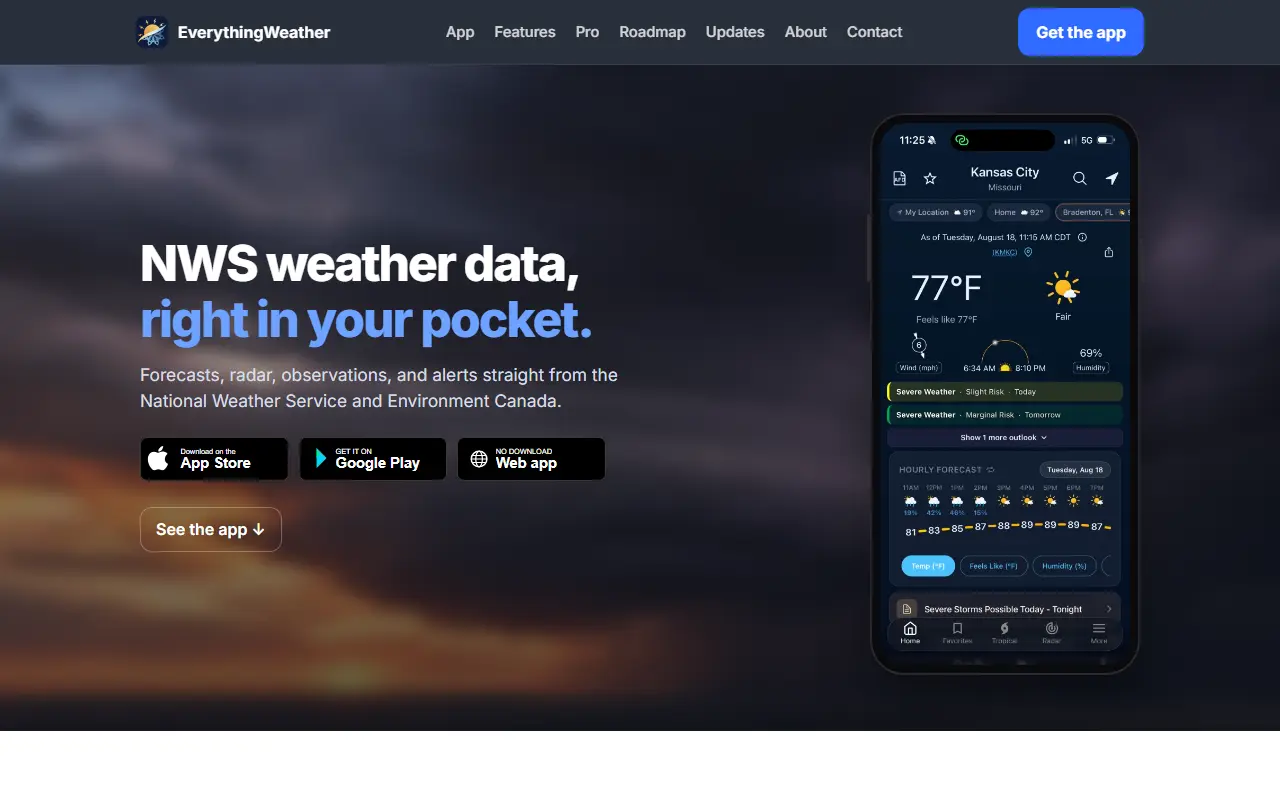
EverythingWeather is a mobile weather app built on data from the US National Weather Service and Environment Canada. It gives forecasts for any point in the United States, its territories and Canada, with a customizable home screen that shows current temperature, wind, the sun's path, active alerts and an hourly graph.
The app goes deeper than a simple icon forecast: tapping a day opens hourly graphs and a written discussion, and the radar screen puts MRMS, lightning, GOES satellite, tropical, SPC and WPC outlooks, tides and observations on one map. A tropical section lists active cyclones around the world, with a live map and individual storm cards, and includes Google's AI cyclone model out to 360 hours. A climate hub shows historical records and normals, and the app can display forecast discussions, air quality, HeatRisk and tide information.
Favorites hold saved locations with watches and warnings, and notifications cover live alerts for as many as 3 locations on the free plan, plus extras such as daily summaries and thresholds. A Pro plan unlocks further data, including an extended forecast for days 8 to 11 and probabilistic temperature information.
Key features
- Hourly and weekly forecasts for the US and Canada
- Radar map with lightning, satellite and outlooks
- Active cyclones worldwide with live map
- NWS forecast discussions and alerts
- Historical climate hub
- Customizable home screen and saved locations
Good fit for
- Tracking severe weather and hurricane activity
- Reading detailed forecast discussions on a phone
EverythingWeather: questions and answers
- What is EverythingWeather used for?
- EverythingWeather is an iOS and Android weather app drawing on National Weather Service and Environment Canada data, with detailed forecasts, a layered radar map and hazard alerts. It is a good fit for tracking severe weather and hurricane activity, and reading detailed forecast discussions on a phone.
- Is EverythingWeather free?
- Yes. EverythingWeather has a free plan, and paid plans start at $3.99 per month.
- Is EverythingWeather open source?
- No. EverythingWeather is proprietary (closed-source) software and can't be self-hosted. In the Productivity category, open-source options include Obtainium, NetNewsWire and Tasks.org.
- What are some alternatives to EverythingWeather?
- Other SaaS products in the Productivity category include CitiScene Weather, Margot and Breeze.
Open-source alternatives to EverythingWeather
See all
Obtainium
Productivity
Get Android app updates straight from the source.
GPL-3.0★ 20k
NetNewsWire
Productivity
RSS reader for macOS and iOS.
MITvs Feedly★ 10k
Tasks.org
Productivity
Bringing Astrid Tasks back from the dead
GPL-3.0vs Todoist★ 5.6kLoop Habit Tracker
Productivity
Loop Habit Tracker, a mobile app for creating and maintaining long-term positive habits
GPL-3.0vs Streaks★ 10k
F-Droid
Productivity
Android client application.
GPL-3.0★ 3.2k
Foqos
Productivity
Foqos allows you to lock apps behind the tap of a NFC tag or scan of a QR code. Free and o
MITvs Freedom★ 860
SaaS alternatives to EverythingWeather
See all
CitiScene Weather
Productivity
iOS weather app that shows forecasts as AI-generated 3D diorama scenes of your city
SaaS
Margot
Productivity
Wardrobe app that digitises your clothes and suggests a daily outfit from weather and calendar
SaaS
Breeze
Productivity
Anxiety and panic-relief app with guided breathing, CBT thought records, meditations and mood tracking
SaaS
Buma Baby Tracker
Productivity
Baby tracker and shared family journal for sleep, feeds, diapers and tummy time that caregivers can edit together
SaaS
Calchi AI
Productivity
AI calorie tracking app where you snap a meal photo and log peptide doses
SaaS
DineJot
Productivity
Meal planning and recipe app
SaaS