
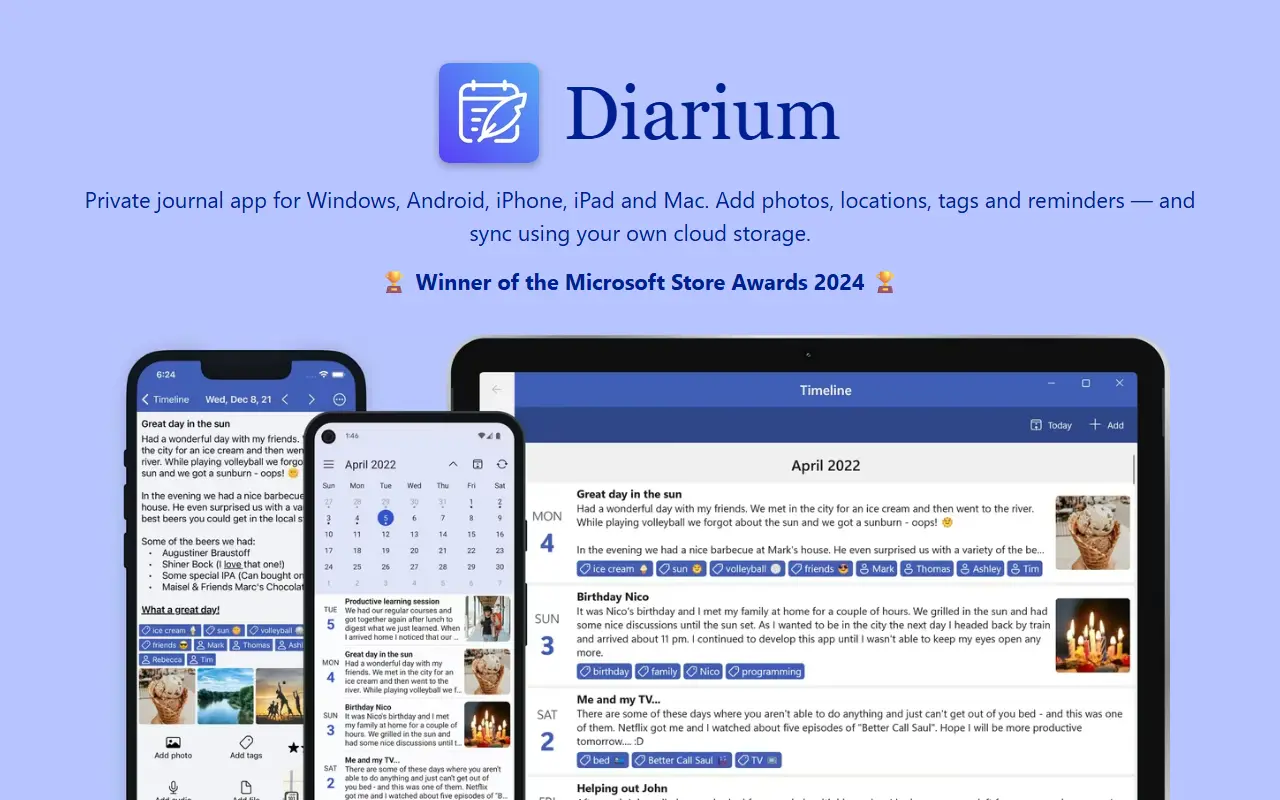
About Diarium
Diarium is a personal diary application available on Windows, Android, iPhone, iPad and Mac. It is built around privacy: you can start writing without creating an account, and entries can stay on your own device. It suits people who want to keep a long-term journal across several devices without handing their writing to a third-party service.
Entries can include formatted text, photos, videos, audio recordings and other files, along with locations and tags. Dictation is available for hands-free writing. To look back, Diarium offers map, gallery, calendar and timeline views, plus notifications that resurface entries written on the same date in earlier years. Optional integrations can pull in context such as photos, calendar events, social media posts, activity data and weather.
Syncing is optional and uses cloud storage you control, namely OneDrive, Google Drive, Dropbox, iCloud or WebDAV, instead of a vendor-run server. Diarium is a proprietary commercial app; its homepage describes Diarium Pro as a one-time purchase for each platform rather than a subscription.
Key features
- Entries with photos, video, audio and file attachments
- Rich text formatting with locations and tags
- Dictation for hands-free writing
- Map, gallery, calendar and timeline views
- On This Day notifications for older entries
- Optional sync via OneDrive, Google Drive, Dropbox, iCloud or WebDAV
- Writing without creating an account
- Context from connected photos, calendar and weather
Good fit for
- →Keeping a private daily journal
- →Travel diaries with photos and map view
- →Revisiting memories from past years
- Tags
- diary
- journal
- private
- cross-platform
- notes
- sync
- windows
- mobile
Diarium: questions and answers
- What is Diarium used for?
- Diarium is a private diary app for Windows, Android, iPhone, iPad and Mac that works without an account and can sync through cloud storage you already use. It is a good fit for keeping a private daily journal, travel diaries with photos and map view, and revisiting memories from past years.
- Is Diarium free?
- Yes. Diarium has a free plan.
- Is Diarium open source?
- No. Diarium is proprietary (closed-source) software. In the Note Taking category, open-source options include Standard Notes, Simplenote and Journiv.
Open-source alternatives to Diarium
See all
Standard Notes
Note Taking
Think fearlessly with end-to-end encrypted notes and files. For issues, visit https://stan
AGPL-3.0vs Evernote★ 6.6k
Simplenote
Note Taking
Simplenote for Web, Windows, and Linux
GPL-2.0vs Evernote★ 5.3k
Journiv
Note Taking
Journiv - Self hosted private journaling app
OSSvs Day One★ 1.2k
GitJournal
Note Taking
Mobile first Note Taking integrated with Git
AGPL-3.0vs Evernote★ 4.2k
Linked
Note Taking
🧾 Daily journaling without distraction. An easy, distraction-free way to record your tho
GPL-3.0vs Day One★ 1kWiki.vim
Note Taking
A wiki plugin for Vim
MIT★ 779
SaaS alternatives to Diarium
See all
Day One
Note Taking
Journaling app with photos, tags and encrypted sync
SaaS
Journey
Note Taking
Journaling and diary app available on mobile, desktop and web
SaaS
Penzu
Note Taking
Online diary and journal app with encryption and mobile access
SaaS
Rosebud
Note Taking
AI journaling app with guided prompts and reflection insights
SaaS
Daylio
Note Taking
Mood tracking and micro-journal app for iOS and Android
SaaS
Cozy
Note Taking
Local-only journaling app that stores entries as plain files on your device with no sync or AI
SaaS